Don't Throw Anything Away with Pausable Downloads
Once upon a time, an app was just a stripped-down version of a website. Those days are long gone. Our users now expect to be able to do everything through the app that they can do through the website, and that expectation has made our apps increasingly media-hungry. Despite network speeds increasing year-on-year, network requests are still the most likely source of bottlenecks, especially media requests. Every time a user has to wait for a network request to complete before they can get on with their task, we risk losing that user.
A common approach to alleviating these bottlenecks is to cancel network requests as soon as they are no longer needed. While this approach is valid in some scenarios, I have too often seen it applied naively to all network requests. Picture a user scrolling through a feed of cat photos. A photo scrolls off-screen when its download is 70% complete, so its request is cancelled, and that progress is thrown away. A moment later, the user scrolls back up, and the same photo is requested again - this time starting from 0%, spending time downloading data the app already had 😞.

This post will explore how we can build a better downloading approach that doesn't throw away data and merges duplicate requests for the same asset - all without requiring any extra effort from the consumer of the download layer.
This post will gradually build up to a working example. But I get it, avoiding waiting is what brought you here in the first place, so if your desire to see how things turn out is too much, head on over to the completed example and take a look at
DownloaderandDownloadto see how things end up. To run the example project, follow the instructions below.
Can This Download Be Resumed?
Just because we want to resume a cancelled download doesn't mean that we can. For resumption to be possible, all of the following need to be true:
- The resource has not changed since it was first requested.
- The task is an
HTTPorHTTPSGETrequest. - The server provides either the
ETagorLast-Modifiedheader (or both) in its response. - The server supports byte-range requests.
If all of the above is true, then congratulations, you are ready for the rest of this post; if it isn't, then you have some work to do before the solution below will be of any use.
Just because you can pause and resume a download doesn't mean you should. If an asset is small enough, it's often more efficient to let it finish than to pause it and resume it later. And if your app isn't very media-heavy, you don't need the complexity this solution would introduce. That said, I'd still recommend reading the rest of this post - I have, and it's very good 😜.
How Does URLSession Handle Downloads and Cancellation?
Now, before we start building, let's look briefly at how URLSession handles downloads and cancellation.
URLSession doesn't make network requests itself. Instead, it creates URLSessionTask instances that do. We could use URLSessionDataTask to retrieve an image, but URLSessionDownloadTask is better suited to our needs, as it allows a download to be paused and resumed.
URLSession offers two ways of hearing back from a download: a completion handler passed in when the task is created using downloadTask(with:completionHandler:), or a single URLSessionDownloadDelegate that URLSession reports to about every task in the session. The completion handler is only called once a download has ended, whereas the delegate also hears about each download as it progresses and when it resumes. We will only use the delegate, so every event for every task arrives in one place.
The closure-based approach is the more convenient of the two, and it's where I started when I first wrote this downloader. But to prove that resuming actually works, we'll need to know where a resumed download picked up from - something only the delegate is told. So I ended up with a closure for each download's result, a delegate to hear about resumes, and I even managed to sprinkle some KVO magic dust for progress updates - leaving each download's events reported in three different ways 🤮.
URLSessionDownloadTask has two methods for cancelling a download:
cancel()- the download is stopped, and any data downloaded so far is discarded.cancel(byProducingResumeData:)- the download is stopped, but any data downloaded so far is kept in a temporary location on the file system, and details of the partial download are passed back as aDatainstance.
The Data instance handed back by cancel(byProducingResumeData:) is not the actual data downloaded so far. Instead, it describes the partial download: where the downloaded data should be on the file system and which parts of the asset it covers. Passing it to downloadTask(withResumeData:) creates a new URLSessionDownloadTask that carries on from where the cancelled one stopped.
Our download layer will only ever use the second method. Callers will ask for a download to be cancelled, but underneath, we will pause it instead 😉.
You might be thinking:
"Why not just call suspend() on the task?"
It's a good idea; however, calling suspend() on an active download doesn't actually stop that download (even though the URLSessionDownloadTask instance will report that it's stopped downloading). You can see this in action if you use Charles Proxy to snoop on a supposedly suspended download.
Looking at What We Need to Build
Our download layer has five primary responsibilities:
- Downloading the requested asset.
- Coalescing duplicate requests for the same asset.
- Cancelling (pausing) a caller's interest in a download.
- Resuming paused downloads.
- Purging paused downloads when memory is running low.
These responsibilities together produce the following class structure:
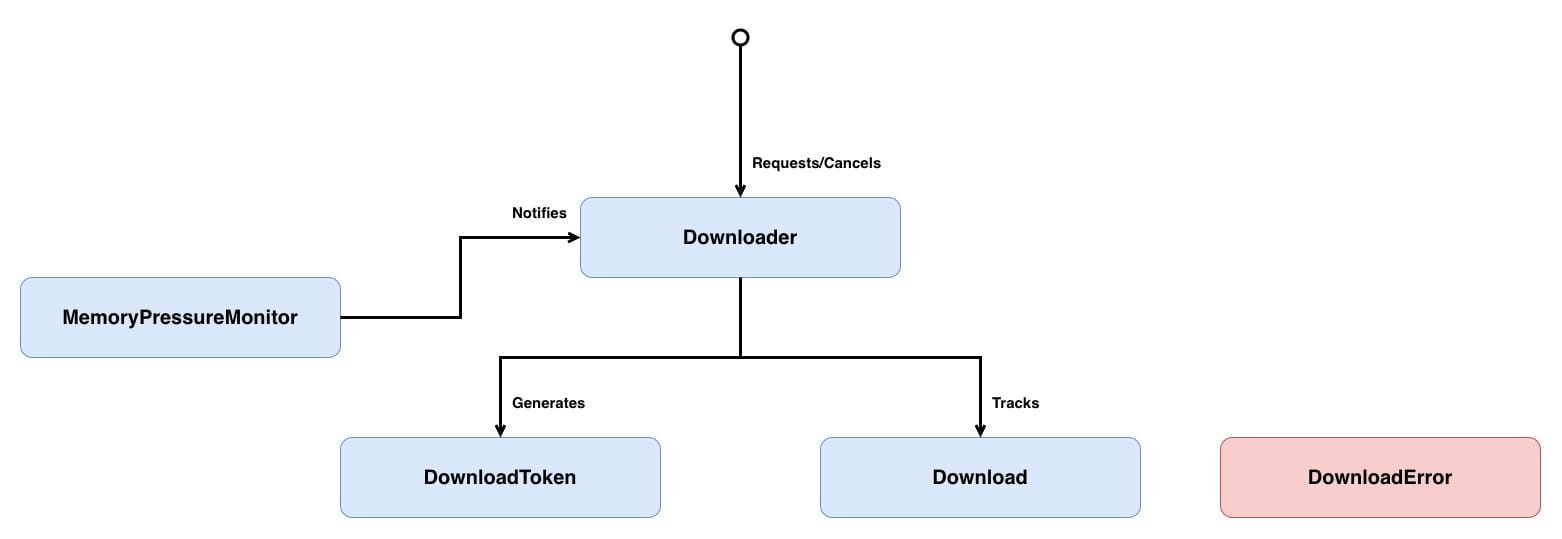
Downloadermakes every decision: starting, coalescing, cancelling, pausing, resuming and purging.Downloadholds a running task and the callers waiting on it.DownloadTokenidentifies one caller's interest in a download.MemoryPressureMonitortellsDownloaderwhen the system is running low on memory.DownloadErrordescribes why a caller didn't get its asset.
Don't worry if that doesn't all make sense yet; we will look into each component in greater depth below.
Now that we know where we are going, let's start with Downloader itself and the queue that will keep its state safe.
Keeping Shared State on One Queue
Let's build the skeleton of Downloader:
// 1
final class Downloader: NSObject {
    // 2
    static let shared = Downloader()

    // 3
    private override init() {
        super.init()
    }
}
Here's what we did:
Downloaderwill receive updates about its downloads throughURLSessionDownloadDelegate, which requires it to be a subclass ofNSObject(we will add conformance toURLSessionDownloadDelegatelater in an extension).Downloaderis a singleton, as we want all downloads to go through the same instance, allowing any duplicate download requests to be spotted and coalesced.init()is private to ensure that another instance ofDownloadercannot be created.
With every download going through the one Downloader, it needs a session to make those downloads with:
final class Downloader: NSObject {
    // 1
    private lazy var session: URLSession = {
        let configuration = URLSessionConfiguration.default

        // 2
        configuration.requestCachePolicy = .reloadIgnoringLocalCacheData
        configuration.urlCache = nil

        // 3
        return URLSession(configuration: configuration,
                          delegate: self,
                          delegateQueue: nil)
    }()

    // Omitted other properties and methods
}Downloaderis the delegate of its session, but a session's delegate can only be set when that session is created - andselfcan't be passed anywhere untilDownloaderhas been initialised. Alazyproperty delays creating the session until its first use, by which pointselfis available.- For demonstration purposes, caching is disabled so that every request goes to the network, allowing us to see downloads being paused and resumed.
- Passing
nilas thedelegateQueuemeansURLSessioncreates its own serial operation queue for delegate calls. That queue isn't the main queue, and it isn't whichever queue our callers are on - which will matter shortly.
Downloader will keep track of its running downloads in a dictionary keyed by URL - downloads. That dictionary will be read and written from two directions: callers asking for downloads, most likely from the main queue, and URLSession reporting back on its delegate queue. Two threads reading and writing the same dictionary is a race condition waiting to happen, so before adding it, let's add a way to make sure it can only ever be accessed by one thread at a time:
final class Downloader: NSObject {
    // 1
    private let queue = DispatchQueue(label: "com.williamboles.downloader")

    // Omitted other properties and methods

    // 2
    private func sync<T>(_ body: () -> T) -> T {
        // 3
        dispatchPrecondition(condition: .notOnQueue(queue))

        return queue.sync(execute: body)
    }
}queueis a serial queue - it runs one block at a time, in the order the blocks were added. AsURLSessioncalls back on its own delegate queue rather than the queue a download was started from,Downloadercan't rely on any one caller's queue to keep its state safe. Instead, any state that is shared across threads will only ever be touched from inside a block running onqueue, so no two threads can touch it at the same time, whichever queue a call arrives on.sync(_:)is the only way ontoqueue. Reading shared state, deciding what to do based on it and then changing it happens inside a singlesync(_:)block, so that read-modify-write is one indivisible step. Asqueue.sync(execute:)waits for the block to finish before returning, the generic return type lets a block hand a value back out, which we'll make use of later.queue.sync(execute:)isn't reentrant - callingsync(_:)from inside anothersync(_:)would deadlock - sodispatchPrecondition(condition:)turns that deadlock into an immediate crash.
You might think crashing the app is an odd choice, but it's a fail-fast approach. Threading issues like this are often hard to reproduce and easy to miss during development when they do happen - by crashing the app we make them impossible to miss.
Downloading an Asset
With shared state protected, let's look at what downloads will hold. Each entry needs a running task and a way to tell its caller how that download went:
// 1
typealias DownloadCompletionHandler = (Result<Data, Error>) -> ()

final class Downloader: NSObject {
    // 2
    private final class Download {
        let task: URLSessionDownloadTask
        let completionHandler: DownloadCompletionHandler

        init(task: URLSessionDownloadTask,
             completionHandler: @escaping DownloadCompletionHandler) {
            self.task = task
            self.completionHandler = completionHandler
        }
    }

    // 3
    private var downloads = [URL: Download]()

    // Omitted other properties and methods
}DownloadCompletionHandleris the closure a caller passes in to hear how its download went. Naming it keeps(Result<Data, Error>) -> ()out of every signature that passes the closure around - andDownloadis only the first of several.Downloadpairs a running task with the caller waiting on it. It's private, as nothing outside ofDownloaderneeds to know it exists. It's a class for a reason we'll see when we add coalescing.downloadsholds only downloads that have a running task - one entry per URL.
Now we can start a download:
final class Downloader: NSObject {
    // Omitted properties and other methods

    // 1
    func download(_ url: URL,
                  completionHandler: @escaping DownloadCompletionHandler) {
        sync {
            downloads[url] = Download(task: startTask(for: url),
                                      completionHandler: completionHandler)
        }
    }

    // 2
    private func startTask(for url: URL) -> URLSessionDownloadTask {
        dispatchPrecondition(condition: .onQueue(queue))

        let task = session.downloadTask(with: url)
        task.resume()

        return task
    }
}download(_:completionHandler:)starts a task and records it indownloads. Internally,Downloaderhears about downloads through its delegate, but callers still get the convenience of a completion handler.startTask(for:)must only ever be called from insidesync(_:), and its precondition enforces that.sessionis only touched here, onqueue, which matters, as alazyproperty isn't thread-safe.
Before we find out how a download went, let's add a method to handle removing a download from downloads:
final class Downloader: NSObject {
    // Omitted properties and other methods

    // 1
    private func clearDownload(for url: URL) -> DownloadCompletionHandler? {
        sync {
            guard let download = downloads[url] else {
                return nil
            }

            downloads[url] = nil

            return download.completionHandler
        }
    }
}clearDownload(for:)looks up the download and removes it inside the samesync(_:)block, so another thread can't slip in between the check and the removal. The completion handler is handed back rather than called here, so that it's called oncesync(_:)has returned.
Now that we can clear a download, let's put it to use by conforming Downloader to URLSessionDownloadDelegate.
Not every download ends well, so before conforming, let's add a type to describe the unhappy paths through Downloader:
enum DownloadError: Error {
    case fileReadFailed(Error)
}
fileReadFailed is for when a download succeeds, but the downloaded file can't be read.
Now let's find out how a download went, starting with a download that completes:
// 1
extension Downloader: URLSessionDownloadDelegate {

    // 2
    func urlSession(_ session: URLSession,
                    downloadTask: URLSessionDownloadTask,
                    didFinishDownloadingTo location: URL) {
        // 3
        guard let url = downloadTask.originalRequest?.url else {
            return
        }

        guard let completionHandler = clearDownload(for: url) else {
            return
        }

        // 4
        let result: Result<Data, Error>
        do {
            result = .success(try Data(contentsOf: location))
        } catch let error {
            result = .failure(DownloadError.fileReadFailed(error))
        }

        // 5
        completionHandler(result)
    }
}Downloaderconforms toURLSessionDownloadDelegatein an extension, within the same file.urlSession(_:downloadTask:didFinishDownloadingTo:)is called once a download task has finished writing the server's response to a temporary file on disk.downloadsis keyed by the URL the caller asked for. AURLSessionDownloadTaskautomatically follows redirects, which changes the URL of itscurrentRequest, sooriginalRequestis used to get back to the URL that the download is stored under.- When
URLSessionDownloadTaskcompletes a download, it will store that downloaded content in a temporary location -location. iOS only guarantees until the end of this method that the downloaded content will be found atlocation. So we need to convert that downloaded file into aDatainstance to be returned as theresult. If the file can't be read, the download is treated as a failure. - The completion handler is called outside of
queue. That way, a caller that blocks its thread can't hold upqueue, and a caller that asks for another download from inside its completion handler doesn't trip the precondition insync(_:).
Caching assets isn't the responsibility of
Downloader- once theDatais handed over, whether it's cached is up to the caller.
When a Download Goes Wrong
urlSession(_:downloadTask:didFinishDownloadingTo:) is only called for a download that made it to disk. When a download fails, URLSession tells us through a different method, and DownloadError needs a case to describe that failure:
enum DownloadError: Error {
    // Omitted other cases
    case transportFailure(Error)
}
transportFailure is for when the download itself fails - such as the connection dropping.
Now we can handle that failure:
extension Downloader: URLSessionDownloadDelegate {
    // 1
    func urlSession(_ session: URLSession,
                    task: URLSessionTask,
                    didCompleteWithError error: Error?) {
        guard let error = error,
              let url = task.originalRequest?.url else {
            return
        }

        guard let completionHandler = clearDownload(for: url) else {
            return
        }

        completionHandler(.failure(DownloadError.transportFailure(error)))
    }
}urlSession(_:task:didCompleteWithError:)is called for every task once it has finished, including those that have already been handled inurlSession(_:downloadTask:didFinishDownloadingTo:). Those arrive here with anilerror, so only a task with anerrorgoes any further.
There's one more way a download can go wrong, and URLSession won't tell us about it. urlSession(_:task:didCompleteWithError:) only reports a transport failure - a request that couldn't reach the server or a connection that dropped partway through. If the server responds with a 404 or a 500, then as far as URLSession is concerned, the download worked: the response body is written to disk and handed to urlSession(_:downloadTask:didFinishDownloadingTo:) as though it were the asset that was asked for. Left unchecked, a caller asking for a cat photo gets handed an error page instead 😿.
To describe these failures, DownloadError needs two more cases:
enum DownloadError: Error {
    // Omitted other cases
    case invalidResponse
    case unacceptableStatusCode(Int)
}
invalidResponse is for when a download completes without an HTTP response, and unacceptableStatusCode is for when the server responds with a status code outside of the 2xx range.
Now the response can be checked before the downloaded file is read:
extension Downloader: URLSessionDownloadDelegate {
    func urlSession(_ session: URLSession,
                    downloadTask: URLSessionDownloadTask,
                    didFinishDownloadingTo location: URL) {
        guard let url = downloadTask.originalRequest?.url else {
            return
        }

        guard let completionHandler = clearDownload(for: url) else {
            return
        }

        // 1
        guard let statusCode = (downloadTask.response as? HTTPURLResponse)?.statusCode else {
            completionHandler(.failure(DownloadError.invalidResponse))

            return
        }

        // 2
        guard (200..<300).contains(statusCode) else {
            completionHandler(.failure(DownloadError.unacceptableStatusCode(statusCode)))

            return
        }

        // Omitted unchanged code
    }
}- As touched on at the start,
Downloaderis built only to supportHTTPandHTTPSdownloads, as these are the only downloads that can be resumed. A response which isn't anHTTPURLResponseinstance is treated as a failure. - Any status code in the
2xxrange is accepted rather than just200, as a resumed download (which we'll get to later) completes with206.
Both checks come after clearDownload(for:), so by the time either runs, the download has already been removed from downloads. That's why each unhappy path calls the completion handler rather than just returning; otherwise, the caller would be left waiting on a download that no longer exists.
Coalescing Duplicate Requests
It's not uncommon for the same asset to be requested multiple times at once - two screens showing the same cat photo, for example. With Downloader as it currently stands, the second request replaces the first in downloads. Two tasks now download the same asset, and the first caller's completion handler is lost, never to be called 😱.
Rather than starting a second task, the second request should coalesce (or merge) onto the task that is already running:
final class Downloader: NSObject {
    private final class Download {
        let task: URLSessionDownloadTask
        // 1
        var completionHandlers = [DownloadCompletionHandler]()

        init(task: URLSessionDownloadTask) {
            self.task = task
        }
    }

    // Omitted other properties and methods

    func download(_ url: URL,
                  completionHandler: @escaping DownloadCompletionHandler) {
        sync {
            // 2
            let download: Download
            if let existingDownload = downloads[url] {
                download = existingDownload
            } else {
                download = Download(task: startTask(for: url))
                downloads[url] = download
            }

            // 3
            download.completionHandlers.append(completionHandler)
        }
    }

    // 4
    private func clearDownload(for url: URL) -> [DownloadCompletionHandler]? {
        sync {
            // Omitted unchanged code

            return download.completionHandlers
        }
    }
}- A
Downloadcan now have any number of callers waiting on it. AcompletionHandleris no longer passed in duringinit. - If a download of
urlis already running, the new request uses it; otherwise, a new task is started. - The caller's completion handler is added to the download. This is why
Downloadis a class -downloadis the same instance that is stored indownloads, so adding to it doesn't need to be written back into the dictionary. clearDownload(for:)now returns every completion handler for thaturl.
Once a download completes, everybody waiting on it needs to hear about it:
extension Downloader: URLSessionDownloadDelegate {
    func urlSession(_ session: URLSession,
                    downloadTask: URLSessionDownloadTask,
                    didFinishDownloadingTo location: URL) {
        guard let url = downloadTask.originalRequest?.url else {
            return
        }

        guard let completionHandlers = clearDownload(for: url) else {
            return
        }

        guard let statusCode = (downloadTask.response as? HTTPURLResponse)?.statusCode else {
            let result: Result<Data, Error> = .failure(DownloadError.invalidResponse)
            completionHandlers.forEach { $0(result) }

            return
        }

        guard (200..<300).contains(statusCode) else {
            let result: Result<Data, Error> = .failure(DownloadError.unacceptableStatusCode(statusCode))
            completionHandlers.forEach { $0(result) }

            return
        }

        // Omitted unchanged code

        // 1
        completionHandlers.forEach { $0(result) }
    }

    func urlSession(_ session: URLSession,
                    task: URLSessionTask,
                    didCompleteWithError error: Error?) {
        // Omitted unchanged code

        guard let completionHandlers = clearDownload(for: url) else {
            return
        }

        let result: Result<Data, Error> = .failure(DownloadError.transportFailure(error))
        completionHandlers.forEach { $0(result) }
    }
}- The result is made once and handed to everybody who coalesced onto the download - whether that's the downloaded asset or one of the failures.
Cancelling Without Throwing Anything Away
A caller that no longer needs an asset - a cell that has scrolled off screen, a screen that has been dismissed - needs a way to say so. Two things need to be true when it does:
- One caller cancelling mustn't affect anybody else coalesced onto the same download.
- When the last caller cancels, the progress made so far must be kept.
At the moment, a caller is just a closure in an array, so there is no way to pick out which one wants to leave. Callers need something to identify them:
// 1
struct DownloadToken: Hashable {
    private let id = UUID()
}DownloadTokenidentifies one caller's interest in a URL rather than one download. As each token holds its ownUUID, two callers asking for the same URL get different tokens, allowing each to cancel independently.DownloadTokenconforms toHashableso that it can be used as a dictionary key.
Download can key its completion handlers using DownloadToken:
final class Downloader: NSObject {
    private final class Download {
        let task: URLSessionDownloadTask
        // 1
        var completionHandlers = [DownloadToken: DownloadCompletionHandler]()

        // Omitted unchanged code
    }

    // Omitted other properties and methods

    // 2
    @discardableResult
    func download(_ url: URL,
                  completionHandler: @escaping DownloadCompletionHandler) -> DownloadToken {
        let token = DownloadToken()

        sync {
            // Omitted unchanged code

            // 3
            download.completionHandlers[token] = completionHandler
        }

        return token
    }

    private func clearDownload(for url: URL) -> [DownloadCompletionHandler]? {
        sync {
            // Omitted unchanged code

            // 4
            return Array(download.completionHandlers.values)
        }
    }
}completionHandlersis now a dictionary keyed byDownloadToken, so each caller's completion handler can be found - and removed - on its own.download(_:completionHandler:)now makes a new token for each request and returns it. It's marked as@discardableResultso that callers that never cancel don't need to hold onto it.- As each token is unique, adding a completion handler joins whoever is already waiting.
- The completion handlers are copied out of the dictionary while still on
queue.
A caller that cancels still needs to be answered, so DownloadError needs one more case:
enum DownloadError: Error {
    // Omitted other cases
    case cancelled
}
cancelled is for when a caller cancels its interest in a download.
Now we can cancel:
final class Downloader: NSObject {
    // Omitted properties and other methods

    // 1
    func cancel(_ token: DownloadToken) {
        // 2
        let (completionHandler, pausedDownload): (DownloadCompletionHandler?, (task: URLSessionDownloadTask, url: URL)?) = sync {
            // 3
            guard let (url, download) = downloads.first(where: { $0.value.completionHandlers[token] != nil }),
                  let completionHandler = download.completionHandlers.removeValue(forKey: token) else {
                return (nil, nil)
            }

            // 4
            guard download.completionHandlers.isEmpty else {
                return (completionHandler, nil)
            }

            // 5
            downloads[url] = nil

            return (completionHandler, (download.task, url))
        }

        // 6
        if let pausedDownload {
            pausedDownload.task.cancel(byProducingResumeData: { [weak self] resumptionData in
                self?.storeResumptionData(resumptionData,
                                          for: pausedDownload.url)
            })
        }

        // 7
        completionHandler?(.failure(DownloadError.cancelled))
    }
}cancel(_:)is the only way for a caller to stop a download. There is nopause(_:)- to callers, a download is either wanted or it isn't.- As
downloadsis searched, checked and then mutated, the whole operation is wrapped inside onesync(_:)block so that nothing can changedownloadspartway through. The block hands back the completion handler to call and, if this was the last caller, the task to pause along with its URL. - A token doesn't carry its URL, so
downloadsis searched for the download that the token is waiting on. There are only ever a handful of downloads running, so a linear search is fine. If no download has the token, then that download has already completed (and the caller has already been answered) or the caller has already cancelled - either way, there is nobody to tell. - If other callers are still waiting, only this caller leaves, and the task carries on for everybody else.
- If this was the last caller, the download is removed from
downloadsstraight away rather than once pausing has finished. A pause is never left half-done, and the next request forurlalways starts a new task. - The task is paused by cancelling it with
cancel(byProducingResumeData:). The resumption data arrives later, on a queue we don't control, so it is handed tostoreResumptionData(_:for:)to be stored safely. - Only this caller is told about the cancel - anybody else coalesced onto the download is still waiting on it. As with completing a download, the completion handler is called outside of
queue. Unlike completing a download, it's called on whichever thread calledcancel(_:).
Now that we can cancel, let's store that resumption data:
final class Downloader: NSObject {
    // 1
    private var resumptionData = [URL: Data]()

    // Omitted other properties and methods

    // 2
    private func storeResumptionData(_ data: Data?,
                                     for url: URL) {
        sync {
            // 3
            guard let data else {
                return
            }

            resumptionData[url] = data
        }
    }
}- Unlike a running download, a paused download has no task and no callers waiting on it, so it's nothing more than the data needed to resume it, keyed by URL.
storeResumptionData(_:for:)is called from the completion handler ofcancel(byProducingResumeData:), so it goes throughsync(_:)like everything else that touchesDownloader's state.- Not every download can produce resumption data - a download from a server that doesn't meet the resumable requirements will produce
nil. With nothing to resume from, the next request forurlstarts from scratch.
Now that we have some resumption data, let's use it by refactoring startTask(for:):
final class Downloader: NSObject {
    // Omitted properties and other methods

    private func startTask(for url: URL) -> URLSessionDownloadTask {
        dispatchPrecondition(condition: .onQueue(queue))

        let task: URLSessionDownloadTask
        // 1
        if let resumptionData = resumptionData.removeValue(forKey: url) {
            task = session.downloadTask(withResumeData: resumptionData)
        } else {
            task = session.downloadTask(with: url)
        }

        task.resume()

        return task
    }
}- If
urlhas resumption data, the new task is created from it and carries on from where the paused task stopped. The resumption data is removed as it's used, as it can only be used once - the new task takes over the partially downloaded file.
There is no resume method on Downloader - requesting the URL again is all it takes.
When Cancels and Requests Overlap
Pausing a download's task with cancel(byProducingResumeData:) is an asynchronous operation, so there is a time gap between Downloader asking for that pause and URLSession getting back to us. Although small, the gap is large enough for a thumb to change scroll direction and kick off a new request for the same asset before the gap can close. When that second request lands in the gap, two things go wrong: resumptionData is populated for a download that has already been replaced in downloads, and urlSession(_:task:didCompleteWithError:) is called for that same replaced download.
Resumption Data for a Replaced Download
When the second request lands in the gap, there is no resumption data to use yet, so a new task is started from scratch and a new Download is stored in downloads. By the time the paused task's resumption data lands, the download it belonged to has been replaced, and the new task has no use for it, so it needs to be discarded:
final class Downloader: NSObject {
    // Omitted properties and other methods

    private func storeResumptionData(_ data: Data?,
                                     for url: URL) {
        sync {
            guard let data else {
                return
            }

            // 1
            guard downloads[url] == nil else {
                return
            }

            resumptionData[url] = data
        }
    }
}- If
urlis back indownloads, the download has been replaced by a new task, so the resumption data is discarded.
It's tempting to have that second request wait for the resumption data instead. But then
Downloaderwould need to track downloads that are partway through being paused, and decide what to do with every caller who arrives in the meantime. When I tried this,Downloaderbecame significantly more complex, and I'd rather live with the occasional re-download than maintain that complexity.
Delegate Calls for a Replaced Download
Once a task has been paused, URLSession calls urlSession(_:task:didCompleteWithError:) for that task, passing a URLError.cancelled error. When no second request has arrived, that call does no harm: the paused download has already been removed from downloads, so clearDownload(for:) finds nothing to clear, and nobody is told anything.
But when the second request lands in the gap, a new Download is created and stored in downloads under the same URL as the paused download. When urlSession(_:task:didCompleteWithError:) is then called for the paused task, clearDownload(for:) finds that new download under the URL and removes it. The new download's callers are told that it failed, while its task carries on consuming bandwidth with no one left to hear about it when it finishes 🤦. The same happens if the task being paused finishes (or fails) before the pause takes effect, with its result handed to the new download's callers.
A URL alone isn't enough to identify a download - clearDownload(for:) also needs to know which task is reporting:
final class Downloader: NSObject {
    // Omitted properties and other methods

    private func clearDownload(for url: URL,
                               taskIdentifier: Int) -> [DownloadCompletionHandler]? {
        sync {
            guard let download = downloads[url] else {
                return nil
            }

            // 1
            guard download.task.taskIdentifier == taskIdentifier else {
                return nil
            }

            downloads[url] = nil

            return Array(download.completionHandlers.values)
        }
    }
}- Only the task currently running for
urlgets to finish its download.taskIdentifieris unique within a session, so anything reported by a task whose download has since been replaced is ignored - whether that's a cancellation, a failure or a finished download.
So, now we need to update our URLSessionDownloadDelegate methods:
extension Downloader: URLSessionDownloadDelegate {
    func urlSession(_ session: URLSession,
                    downloadTask: URLSessionDownloadTask,
                    didFinishDownloadingTo location: URL) {
        guard let url = downloadTask.originalRequest?.url else {
            return
        }

        // 1
        guard let completionHandlers = clearDownload(for: url,
                                                     taskIdentifier: downloadTask.taskIdentifier) else {
            return
        }

        // Omitted unchanged code
    }

    func urlSession(_ session: URLSession,
                    task: URLSessionTask,
                    didCompleteWithError error: Error?) {
        // Omitted unchanged code

        guard let completionHandlers = clearDownload(for: url,
                                                     taskIdentifier: task.taskIdentifier) else {
            return
        }

        // Omitted unchanged code
    }
}- Both delegate methods now pass the identifier of the task that is reporting to
clearDownload(for:taskIdentifier:).
With these two checks, a cancel and a new request can arrive in any order, and every caller is still answered exactly once 🥳.
Letting Go Under Pressure
Every paused download leaves behind the partially downloaded bytes, which URLSession keeps in a temporary file on disk, and the resumption data pointing at that file, which Downloader keeps in memory. Resumption data is small - a property list of a few kilobytes - but nothing removes it unless its URL is requested again. A few minutes of scrolling through a feed can leave hundreds of paused downloads behind, and most will never be asked for again.
Holding on to those paused downloads is cheap, so for most of an app's life there's no reason to let go. That changes when memory runs low. iOS asks each app to free what it can, and an app that doesn't free enough risks being terminated - throwing away every download, running or paused. Purging resumption data is Downloader's share of that clean-up, and the cost is a few images starting again from 0% - an easy trade against the app being terminated.
Purging resumption data doesn't delete the partially downloaded file it pointed to. With nothing left referring to it, that file stays in the app's temporary directory until iOS clears it out, which the system does from time to time while the app isn't running.
DispatchSource can tell us when memory is running low:
final class MemoryPressureMonitor {
    private let source: DispatchSourceMemoryPressure

    init() {
        // 1
        source = DispatchSource.makeMemoryPressureSource(eventMask: [.warning, .critical],
                                                         queue: DispatchQueue(label: "com.williamboles.memorypressure"))
        // 2
        source.activate()
    }

    // 3
    func startMonitoring(handler: @escaping () -> Void) {
        source.setEventHandler(handler: handler)
    }

    // 4
    deinit {
        source.cancel()
    }
}- A memory pressure source fires when the system reports memory pressure - here, at both the
warningandcriticallevels. - The source is activated as soon as it's created, so monitoring runs for the monitor's whole lifetime.
startMonitoring(handler:)only has to say what should happen when memory runs low. An event that arrives before a handler is set is dropped, which is fine here - nothing can have been paused beforeDownloaderhas finished initialising.- When the monitor is deallocated, the source is cancelled so that it stops monitoring.
Let's make use of MemoryPressureMonitor in Downloader:
final class Downloader: NSObject {
    // 1
    private let memoryPressureMonitor = MemoryPressureMonitor()

    // Omitted other properties

    static let shared = Downloader()

    private override init() {
        super.init()

        // 2
        memoryPressureMonitor.startMonitoring { [weak self] in
            self?.purgePausedDownloads()
        }
    }

    // 3
    private func purgePausedDownloads() {
        sync {
            resumptionData.removeAll()
        }
    }

    // Omitted other methods
}Downloaderholds onto its monitor, keeping the memory pressure source alive for as long as the downloader is.- Monitoring starts after
super.init(), as the handler capturesself. - The handler is called on the monitor's queue, so purging goes through
sync(_:)like everything else. Purging is a single line because a paused download is nothing more than its resumption data. Running downloads are left untouched.
How Do We Know It Actually Works?
If you run the example project, you will see images download, but how do we know a download is actually resuming after it's paused and isn't just starting from scratch?
URLSessionDownloadDelegate has a method that is only called for a resumed download, and another that reports progress. Let's use both:
extension Downloader: URLSessionDownloadDelegate {
    // Omitted other methods

    // 1
    func urlSession(_ session: URLSession,
                    downloadTask: URLSessionDownloadTask,
                    didWriteData bytesWritten: Int64,
                    totalBytesWritten: Int64,
                    totalBytesExpectedToWrite: Int64) {
        guard let url = downloadTask.originalRequest?.url else {
            return
        }

        // 2
        guard totalBytesExpectedToWrite > 0 else {
            os_log(.info, "Downloaded %{public}lld bytes of %{public}@ (total size unknown)", totalBytesWritten, url.absoluteString)

            return
        }

        let downloadedPercentage = (Double(totalBytesWritten)/Double(totalBytesExpectedToWrite)) * 100
        os_log(.info, "Downloaded %{public}.02f%% of %{public}@", downloadedPercentage, url.absoluteString)
    }

    // 3
    func urlSession(_ session: URLSession,
                    downloadTask: URLSessionDownloadTask,
                    didResumeAtOffset fileOffset: Int64,
                    expectedTotalBytes: Int64) {
        guard let url = downloadTask.originalRequest?.url else {
            return
        }

        guard expectedTotalBytes > 0 else {
            os_log(.info, "Resuming download: %{public}@ from: %{public}lld bytes (total size unknown)", url.absoluteString, fileOffset)

            return
        }

        // 4
        let resumptionPercentage = (Double(fileOffset)/Double(expectedTotalBytes)) * 100
        os_log(.info, "Resuming download: %{public}@ from: %{public}.02f%%", url.absoluteString, resumptionPercentage)
    }
}urlSession(_:downloadTask:didWriteData:totalBytesWritten:totalBytesExpectedToWrite:)is called each time a chunk of the download arrives, which tells us how far a download had got when it was paused.- When the server doesn't say how big the file is,
URLSessionreports the expected size asNSURLSessionTransferSizeUnknown(-1). Rather than logging a negative percentage, the number of bytes is logged instead. urlSession(_:downloadTask:didResumeAtOffset:expectedTotalBytes:)is only called for a task created from resumption data, withfileOffsetbeing how much of the asset was already downloaded.- The percentage a download resumed at is logged. If resuming works, this should match the last percentage logged before that download was paused.
With this logging, cancel a download partway through and then request it again - the logs will show the download resuming from where it was paused.
If you have a modestly fast internet connection, you will probably struggle to pause a download before it finishes. Use
Network Link Conditionerto throttle your internet connection - just don't forget to turn it off once you're done testing, or you might end up spending some of your Saturday morning on the phone to your ISP complaining about your slow connection and insisting a new router be sent out 🫣.
The example project logs each step of a download - starting, coalescing, pausing, resuming and purging - using
os_log. I've left that logging out of the other snippets in this post to keep the focus on the decisionsDownloadermakes. But I felt that the logs here merited their place in this post.
This has been a fairly long post, so if you've made it here, take a moment to breathe out and enjoy it 👏.
Nothing Thrown Away
Now, when the user scrolls back up, that image picks up from 70% rather than 0%. The feed can cancel as eagerly as it likes. Our users are still going to have to wait for media to download - we just aren't making them wait for the same bytes twice.
To see the complete working example, visit the repository and clone the project.
Note that the code in the repository is unit tested, so it isn't 100% the same as the code snippets shown in this post. The changes mainly involve a greater use of protocols to allow for test-doubles to be injected into the various types - see Let Dependency Injection Lead You to a Better Design for how this works.
Running the Example Project
I've used TheCatAPI in the example project to populate the app with images to download. TheCatAPI has an extensive library of freely available cat photos, which it shares via a JSON-based API. TheCatAPI does require you to register to get full access to its API. Once registered, you will be given an x-api-key token. Create a Secrets.xcconfig file in the root of the project and add your token to it:
CAT_API_KEY = your-api-keySecrets.xcconfig is ignored by git, so your API key stays out of source control.