Can Unit Testing and Core Data become BFFs?
Core Data and Unit Testing belong to the same friend group, but they've never really hit it off. Core Data is all about creating memories that persist long after the app has closed, whereas Unit Testing turns up, runs through its checklist, and then vanishes without a trace.
What on the surface looks like irredeemable differences needn't stop a beautiful friendship from blossoming - after all, UIKit won't stop inviting them to the same parties.

This post will explore how to structure a Core Data stack so it get along with Unit Testing - without building a completely separate testing setup.
Looking at Their Differences ⚔️
Core Data and Unit Testing have two fundamental disagreements:
Treatment of data
- Unit Testing treats data as ephemeral.
- The main use case of Core Data is persisting data between app executions.
Tolerance for delays
- Unit tests should be lightning quick to execute.
- Core Data typically has to communicate with a SQLite file on disk, which is slow (when compared with pure memory operations).
And like building any good relationship, all the changes will come from one side - Core Data.
Please don't take that as genuine relationship advice 😜.
Building That Friendship
Core Data can be configured in many different ways, which makes it difficult to talk about in the abstract. To keep things concrete, here's the specific stack we'll be building and testing in this post:
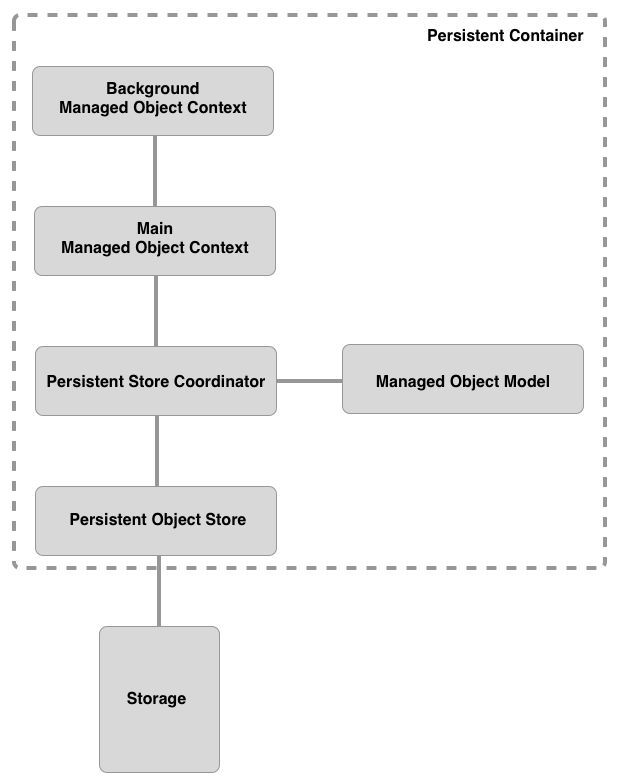
Persistent Containeris a fairly new member of the Core Data family. It was introduced in iOS 10 to help simplify the creation of the managed object model, persistent store coordinator and any managed object contexts.Managed Object Contextis a temporary, in-memory record of allNSManagedObjectinstances accessed, created or updated during its lifecycle. An app typically has multiple contexts in existence at any given time. These contexts will form a parent-child relationship. When a child context is saved, it pushes its changes to its parent's context, which then merges these changes into its own state. At the top of this parent-child hierarchy is themaincontext; this context, upon being saved, will push its changes into the persistent store.Persistent Store Coordinatoracts as an aggregator between the various contexts to ensure the integrity of the persistent store(s). It does this by serialising read/write operations from the contexts to its store(s). There is only one coordinator per Core Data stack.Managed Object Modelis a set of entities that define eachNSManagedObjectsubclass. An entity can be thought of as a table in a database.Persistent Object Storeis an abstraction over the actual storage of our data. It handles communication with that storage, e.g. with SQLite storage, converts fetch requests into SQL statements.StorageIt's common for Core Data storage to be a SQLite store, but the store could also be XML, binary or in-memory.
While this post will gradually build up to a working example, if you are in a hurry, head on over to the completed example and take a look at
CoreDataManager,CoreDataManagerTests,ColorManagerandColorManagerTeststo see how things end up.
Let's build the above stack and unit test it, starting with the manager that will handle setting up and managing the Core Data stack:
// 1
class CoreDataManager {

    // 2
    let persistentContainer: NSPersistentContainer
    let backgroundContext: NSManagedObjectContext
    let mainContext: NSManagedObjectContext

    // MARK: - Init

    // 3
    private init(persistentContainer: NSPersistentContainer) {
        self.persistentContainer = persistentContainer

        // 4
        let backgroundContext = persistentContainer.newBackgroundContext()
        backgroundContext.mergePolicy = NSMergeByPropertyObjectTrumpMergePolicy
        self.backgroundContext = backgroundContext

        // 5
        let mainContext = persistentContainer.viewContext
        mainContext.automaticallyMergesChangesFromParent = true
        self.mainContext = mainContext
    }

    // MARK: - SetUp

    // 6
    static func setUp(completion: @escaping (Result<CoreDataManager, Error>) -> Void) {
        let container = NSPersistentContainer(name: "TestingWithCoreData_Example")

        container.loadPersistentStores { _, error in
            if let error = error {
                completion(.failure(error))
                return
            }

            completion(.success(CoreDataManager(persistentContainer: container)))
        }
    }
}
Here's what we did above:
CoreDataManageris responsible for setting up and owning the Core Data stack.- All three properties are
letconstants - once aCoreDataManagerexists, its stack is fully formed and immutable. - The initialiser is
private, so the only way to create aCoreDataManageris through thesetUp(completion:)factory method. This guarantees that no one can get hold of an instance ofCoreDataManagerbefore its persistent store has loaded. backgroundContextis a private queue context for write operations - creating, updating and deleting managed objects off the main thread. Its merge policy is set toNSMergeByPropertyObjectTrumpMergePolicy, meaning in-memory changes win over store conflicts on a property-by-property basis.mainContextis the container'sviewContext, tied to the main queue for feeding data to the UI. SettingautomaticallyMergesChangesFromParenttotruemeans it picks up changes saved by the background context without manual merging.setUp(completion:)is a static factory that creates and loads the persistent container, then hands back a fully configuredCoreDataManagervia aResult. If loading fails, the error is passed back to the caller rather than crashing - the app layer gets to decide how to handle it. It's an asynchronous method becauseloadPersistentStores(completionHandler:)is asynchronous.
It's unusual to have a
privateinit'er, but doing it this way avoids having to havepreconditionorfatalErrorchecks to ensure the properties ofCoreDataManagerare only accessed aftersetUp(completion:)is called.
Before we can write unit tests for CoreDataManager, we need to first write a helper for NSPersistentContainer that will allow us to more easily tear down the persistent store after each test to ensure that one test isn't able to contaminate any other test by leaving behind data:
extension NSPersistentContainer {
    func destroyPersistentStore() throws {
        guard let storeURL = persistentStoreDescriptions.first?.url,
              let storeType = persistentStoreDescriptions.first?.type else {
            return
        }

        try persistentStoreCoordinator.destroyPersistentStore(at: storeURL,
                                                              ofType: storeType,
                                                              options: nil)
    }
}
With the ability for each test to tidy up after itself, let's write some unit tests for CoreDataManager:
class CoreDataManagerTests: XCTestCase {

    // 1
    func test_givenNoSetup_whenSetUpFinishes_thenCoreDataManagerIsCreated() {
        // 2
        let setUpExpectation = expectation(description: "SetUp completion called")

        // 3
        CoreDataManager.setUp { result in
            // 4
            defer { setUpExpectation.fulfill() }

            // 5
            guard let sut = try? result.get() else {
                XCTFail("Failed to set up Core Data stack")
                return
            }

            // 6
            try? sut.persistentContainer.destroyPersistentStore()
        }

        // 7
        waitForExpectations(timeout: 1.0)
    }
}- The test name follows the
Given-When-Thenunit testing naming convention. This test checks that an instance ofCoreDataManageris created whensetUp(completion:)finishes. - As
setUp(completion:)is asynchronous, we create anXCTestExpectationinstance using the convenience method onXCTestCase, which will allow us to wait for the closure callback before determining if the test passed or failed. Think of an expectation as a promise that something will happen within a given time frame. - We call
CoreDataManager.setUp(completion:)and fulfil the expectation inside the completion closure. deferensures the expectation is fulfilled regardless of which path through the closure we take - success or failure. This avoids duplicating thefulfillcall.- We unwrap the
Resultand fail the test with a descriptive message if setup didn't succeed. - Because
CoreDataManageruses an on-disk store, we clean up the SQLite file after we are done. waitForExpectationspauses the test for up to one second, giving the store time to load. If the expectation isn't fulfilled, the test fails.
There's no overridden
setUpmethod creating a shared instance here. Due to the unusual wayCoreDataManageris initialised, each test creates its ownsutinstance.
There's a problem with test_givenNoSetup_whenSetUpFinishes_thenCoreDataManagerIsCreated as it stands - it writes to an on-disk SQLite store. That's the production behaviour we want, but for tests, it means slower I/O and a SQLite file we need to clean up after every run. Core Data offers a better option for testing: NSInMemoryStoreType. An in-memory store keeps the object graph in RAM - no disk I/O, no leftover files, and the store vanishes the moment the test finishes.
The default Store Type for Core Data is:
NSSQLiteStoreType.
Let's update CoreDataManager so that we can use NSSQLiteStoreType in production and NSInMemoryStoreType in unit testing:
class CoreDataManager {
    // Omitted unchanged functionality

    // 1
    static func setUp(storeType: String = NSSQLiteStoreType,
                  completion: @escaping (Result<CoreDataManager, Error>) -> Void) {
        let container = NSPersistentContainer(name: "TestingWithCoreData_Example")

        // 2
        let description = container.persistentStoreDescriptions.first
        description?.type = storeType

        container.loadPersistentStores { _, error in
            if let error = error {
                completion(.failure(error))
                return
            }

            completion(.success(CoreDataManager(persistentContainer: container)))
        }
    }
}setUpnow takes astoreTypeparameter, defaulting toNSSQLiteStoreType. This keeps the production call site clean while letting tests passNSInMemoryStoreTypefor speed.- We override the container's default store description with whatever
storeTypewas passed in. This is what lets us swap between on-disk and in-memory stores.
As a long-term Objective-C iOS developer, I still get a thrill about being able to provide a default value to a parameter (like we do with the
storeTypeparameter above) without having to create a whole new method.
With this change to CoreDataManager, we need to update test_givenNoSetup_whenSetUpFinishes_thenCoreDataManagerIsCreated to take advantage of it:
class CoreDataManagerTests: XCTestCase {

    func test_givenNoSetup_whenSetUpFinishes_thenCoreDataManagerIsCreated() {
        let setUpExpectation = expectation(description: "SetUp completion called")

        // 1
        CoreDataManager.setUp(storeType: NSInMemoryStoreType) { result in
            defer { setUpExpectation.fulfill() }

            // 2
            guard let _ = try? result.get() else {
                XCTFail("Failed to set up Core Data stack")
                return
            }
        }

        waitForExpectations(timeout: 1.0)
    }
}- We now pass in
NSInMemoryStoreTypeas the store type - avoiding disk I/O and the need to clean up SQLite files afterwards. - The
guardnow just checks that setup succeeded - we don't need to hold onto the instance as we don't need it for clean up.
Don't worry, the code we wrote for
destroyPersistentStore()isn't going to be thrown away.
Let's add two more unit tests to ensure that the persistentContainer is configured with the expected store type:
class CoreDataManagerTests: XCTestCase {
    // Omitted unchanged code

    func test_givenNoSetup_whenSetUpFinishes_thenPersistentContainerLoadedOnDisk() {
        let setUpExpectation = expectation(description: "SetUp completion called")

        // 1
        CoreDataManager.setUp { result in
            defer { setUpExpectation.fulfill() }

            guard let sut = try? result.get() else {
                XCTFail("Failed to set up Core Data stack")
                return
            }

            // 2
            XCTAssertEqual(sut.persistentContainer.persistentStoreDescriptions.first?.type, NSSQLiteStoreType)

            // 3
            try? sut.persistentContainer.destroyPersistentStore()
        }

        waitForExpectations(timeout: 1.0)
    }

    func test_givenNoSetup_whenSetUpFinishes_thenPersistentContainerLoadedInMemory() {
        let setUpExpectation = expectation(description: "SetUp completion called")

        // 4
        CoreDataManager.setUp(storeType: NSInMemoryStoreType) { result in
            defer { setUpExpectation.fulfill() }

            guard let sut = try? result.get() else {
                XCTFail("Failed to set up Core Data stack")
                return
            }

            // 5
            XCTAssertEqual(sut.persistentContainer.persistentStoreDescriptions.first?.type, NSInMemoryStoreType)
        }

        waitForExpectations(timeout: 1.0)
    }
}- We call
setUp(storeType:completion:)without specifying astoreType, so it defaults toNSSQLiteStoreType- the production path. - We assert that the persistent store description's type is
NSSQLiteStoreType, confirming the default was applied. - Because this test created an on-disk SQLite file, we clean it up afterwards. The in-memory test below doesn't need this.
- We pass
NSInMemoryStoreTypeexplicitly, verifying the alternative path that our tests will use. - We assert that the store description's type is
NSInMemoryStoreType, confirming the parameter was applied.
When running the tests, I noticed that
test_givenNoSetup_whenSetUpFinishes_thenPersistentContainerLoadedOnDisktook on average 17 times longer to run thantest_givenNoSetup_whenSetUpFinishes_thenPersistentContainerLoadedInMemory-0.001vs0.017seconds.
With the above test passing, we can write the unit tests to ensure that the context properties of CoreDataManager are correctly configured:
class CoreDataManagerTests: XCTestCase {
    // Omitted unchanged functionality

    // 1
    func test_givenASetUpStack_whenBackgroundContextIsAccessed_thenItIsAPrivateQueue() {
        let setUpExpectation = expectation(description: "SetUp completion called")

        CoreDataManager.setUp(storeType: NSInMemoryStoreType) { result in
            defer { setUpExpectation.fulfill() }

            guard let sut = try? result.get() else {
                XCTFail("Failed to set up Core Data stack")
                return
            }

            XCTAssertEqual(sut.backgroundContext.concurrencyType, .privateQueueConcurrencyType)
        }

        waitForExpectations(timeout: 1.0)
    }

    // 2
    func test_givenASetUpStack_whenMainContextIsAccessed_thenItIsTheMainQueue() {
        let setUpExpectation = expectation(description: "SetUp completion called")

        CoreDataManager.setUp(storeType: NSInMemoryStoreType) { result in
            defer { setUpExpectation.fulfill() }

            guard let sut = try? result.get() else {
                XCTFail("Failed to set up Core Data stack")
                return
            }

            XCTAssertEqual(sut.mainContext.concurrencyType, .mainQueueConcurrencyType)
        }

        waitForExpectations(timeout: 1.0)
    }

    // 3
    func test_givenASetUpStack_whenBackgroundContextIsAccessed_thenMergePolicyIsPropertyObjectTrump() {
        let setUpExpectation = expectation(description: "SetUp completion called")

        CoreDataManager.setUp(storeType: NSInMemoryStoreType) { result in
            defer { setUpExpectation.fulfill() }

            guard let sut = try? result.get() else {
                XCTFail("Failed to set up Core Data stack")
                return
            }

            XCTAssertTrue(sut.backgroundContext.mergePolicy is NSMergePolicy)
            XCTAssertEqual((sut.backgroundContext.mergePolicy as? NSMergePolicy)?.mergeType, .mergeByPropertyObjectTrumpMergePolicyType)
        }

        waitForExpectations(timeout: 1.0)
    }

    // 4
    func test_givenASetUpStack_whenMainContextIsAccessed_thenItAutomaticallyMergesChangesFromParent() {
        let setUpExpectation = expectation(description: "SetUp completion called")

        CoreDataManager.setUp(storeType: NSInMemoryStoreType) { result in
            defer { setUpExpectation.fulfill() }

            guard let sut = try? result.get() else {
                XCTFail("Failed to set up Core Data stack")
                return
            }

            XCTAssertTrue(sut.mainContext.automaticallyMergesChangesFromParent)
        }

        waitForExpectations(timeout: 1.0)
    }
}- We verify that
backgroundContextis configured withprivateQueueConcurrencyType. Write operations need to happen off the main thread - a main queue background context would block the UI during saves. - We verify that
mainContextis configured withmainQueueConcurrencyType. Since this context feeds data to the UI, it needs to be on the main queue so that updates to views happen safely. - We verify that
backgroundContexthas its merge policy set toNSMergeByPropertyObjectTrumpMergePolicy. This means in-memory changes win over store conflicts on a property-by-property basis. If someone accidentally removes or changes this line, the test catches it. - We verify that
mainContexthasautomaticallyMergesChangesFromParentset totrue. Without this, the UI wouldn't pick up changes saved by the background context without manual merging.
The good news is that we have finished creating and testing our Core Data stack 🎉.
Putting That Friendship to Work
There is no point in creating a Core Data stack if we don't actually use it. In the example project, we populate a collection view with instances of a subclass of NSManagedObject - Color. To help us deal with these Color objects, we will be using a ColorManager:
class ColorManager {

    // 1
    let backgroundContext: NSManagedObjectContext

    // MARK: - Init

    init(backgroundContext: NSManagedObjectContext) {
        self.backgroundContext = backgroundContext
    }

    // MARK: - Create

    // 2
    func createColor(hex: String = UIColor.random.hexString,
                     date: Date = Date()) {
        backgroundContext.performAndWait {
            let color = NSEntityDescription.insertNewObject(forEntityName: Color.className,
                                                            into: backgroundContext) as! Color
            color.hex = hex
            color.dateCreated = date

            try? backgroundContext.save()
        }
    }

    // MARK: - Deletion

    // 3
    func deleteColor(_ color: Color) {
        let objectID = color.objectID
        backgroundContext.performAndWait {
            if let colorInContext = try? backgroundContext.existingObject(with: objectID) {
                backgroundContext.delete(colorInContext)

                try? backgroundContext.save()
            }
        }
    }
}ColorManagerdepends on anNSManagedObjectContextrather than onCoreDataManagerdirectly. This decoupling is what makes the class testable - we can inject any context we like.createColor(hex:date:)inserts a newColorinto the background context, then saves.performAndWait(_:)ensures the work runs synchronously on the context's private queue. By injectinghexanddatevalues, we can more easily unit test this method. Check out the example project to see the implementation ofUIColor.random.deleteColor(_:)grabs theobjectIDfrom the passed-inColorbefore entering theperformAndWait(_:)block. This is important because theColorinstance might belong to a different context - the main context, say - so we useexistingObject(with:)to fetch it in the background context before deleting and saving.
You may have noticed the
try?calls when saving the context. In a production app, you'd want to handle those errors properly - logging them, surfacing them to the user, or propagating them to the caller. Here, silencing them keeps the example focused on the testing patterns rather than error handling.
As responsible members of the Core Data community, our example app treats the
backgroundContextas a read-write context and themainContextas a read-only context. This ensures that any time-consuming tasks don't block the main (UI) thread.
Before implementing unit tests for ColorManager, we need to decide how to set up our testing Core Data stack. One approach is to build a separate, test-only stack - something like a TestCoreDataStack type with the async setup stripped out and the store type hardcoded to NSInMemoryStoreType. That gives us a cleaner separation between production and test code, but it also means maintaining a second stack configuration that has to mirror CoreDataManager exactly. Every time we change how CoreDataManager configures its contexts - merge policies, parent-child relationships, concurrency types, etc - we'd need to remember to update the test stack to match. And if we forget, our tests pass against a stack that doesn't reflect production.
The alternative is simpler: reuse CoreDataManager itself, passing NSInMemoryStoreType to its setUp method. This does mean a bug in CoreDataManager could cascade into other tests, resulting in false-failures, but that trade-off cuts the right way - if the stack is broken, I want those tests to fail too, because ColorManager can't function without a working stack.
While we are going with CoreDataManager, there is a practical problem with using it in our test suites. Its setUp(storeType:completion:) method is asynchronous, which means every test that needs a stack would have to create an expectation, wait for the callback, and only then start doing actual test work. That's a lot of ceremony for something that should be a single line in a test suite:
extension CoreDataManager {
    static func setUpForTesting() -> CoreDataManager {
        var manager: CoreDataManager!

        let semaphore = DispatchSemaphore(value: 0)

        setUp(storeType: NSInMemoryStoreType) { result in
            manager = try? result.get()
            semaphore.signal()
        }

        semaphore.wait()

        return manager
    }
}
setUpForTesting() solves this by wrapping the asynchronous call in a DispatchSemaphore. The semaphore starts at zero, so wait() blocks the calling thread immediately. When the in-memory store finishes loading, the completion assigns the manager and calls signal(), unblocking the wait. Since in-memory stores load near-instantly, the block is effectively momentary. The result is a synchronous factory that returns a fully configured CoreDataManager without expectations or callbacks.
Using a
DispatchSemaphorein this manner is dangerous, and this approach should be avoided in production code.
With our handy setUpForTesting() method, let's add some unit tests for ColorManager:
class ColorManagerTests: XCTestCase {
    // 1
    var sut: ColorManager!
    var coreDataManager: CoreDataManager!

    // MARK: - Lifecycle

    // 2
    override func setUp() {
        super.setUp()

        coreDataManager = CoreDataManager.setUpForTesting()

        sut = ColorManager(backgroundContext: coreDataManager.backgroundContext)
    }

    // MARK: - Tests

    // MARK: Init

    // 3
    func test_givenACoreDataStack_whenColorManagerIsInitialised_thenContextIsSetUp() {
        XCTAssertEqual(sut.backgroundContext, coreDataManager.backgroundContext)
    }
}- Alongside our
sut, we declare aCoreDataManagerinstance. We need both becausesutdepends on the context thatcoreDataManagerprovides, and some tests will need to fetch data directly from the manager's contexts to verify whatColorManagerdid. - In
setUp(), we usesetUpForTesting()to create a fully configured in-memory Core Data stack synchronously, then inject itsbackgroundContextintoColorManager. A fresh stack is created before every test, so data from one test can never leak into another. - A simple sanity check that the context we injected is the same one assigned to the
backgroundContextproperty.
Notice there's no tearDown() method here. Because setUp() creates a fresh in-memory stack before every test, there's nothing to clean up - the store vanishes when the test finishes.
That
destroyPersistentStore()helper we wrote earlier is only needed when the SQLite store is involved.
Let's look at a more complex test:
class ColorManagerTests: XCTestCase {
    // Omitted other functionality

    // 1
    func test_givenNoExistingColors_whenCreateColorIsCalled_thenAColorRecordIsCreated() {
        let hex = UIColor.random.hexString
        let date = Date.distantPast

        // 2
        sut.createColor(hex: hex,
                        date: date)

        // 3
        let request = NSFetchRequest<Color>(entityName: Color.className)
        let colors = try! coreDataManager.backgroundContext.fetch(request)

        // 4
        guard let color = colors.first else {
            XCTFail("color missing")
            return
        }

        // 5
        XCTAssertEqual(colors.count, 1)
        XCTAssertEqual(color.hex, hex)
        XCTAssertEqual(color.dateCreated, date)
    }
}- This test verifies that calling
createColor(hex:date:)actually persists a fully populatedColorrecord in Core Data. - We call
createColor(hex:date:)on oursut. SinceperformAndWait(_:)is synchronous, the work is done by the time this returns. - We fetch all
Colorrecords directly from the background context, going to the store rather than relying on any state inColorManager. - The
guardgives us an early, descriptive failure if noColorwas found. Without this, we'd get a less helpful index-out-of-bounds crash or a vague nil-related failure further down. - Three asserts, all verifying the same unit of work - that
createColor(hex:date:)produced a single, fully populatedColorand saved it. We check that the count is exactly one, thathexmatches thehexvalue passed in, and thatdateCreatedmatches thedatevalue passed in.
We know that creating one Color is successful. Let's make sure that creating multiple Color records is also successful:
class ColorManagerTests: XCTestCase {
    // Omitted other functionality

    func test_givenNoExistingColors_whenCreateColorIsCalledMultipleTimes_thenMultipleColorRecordsAreCreated() {
        sut.createColor()
        sut.createColor()

        let request = NSFetchRequest<Color>(entityName: Color.className)
        let colors = try! coreDataManager.backgroundContext.fetch(request)

        XCTAssertEqual(colors.count, 2)
        XCTAssertNotEqual(colors[0].hex, colors[1].hex)
    }
}
Testing the deletion of a Color follows a similar pattern:
class ColorManagerTests: XCTestCase {
    // Omitted other functionality

    // 1
    func test_givenMultipleColors_whenDeleteColorIsCalled_thenColorRecordIsDeleted() {
        // 2
        let colorA = NSEntityDescription.insertNewObject(forEntityName: Color.className,
                                                         into: coreDataManager.backgroundContext) as! Color
        let colorB = NSEntityDescription.insertNewObject(forEntityName: Color.className,
                                                         into: coreDataManager.backgroundContext) as! Color
        let colorC = NSEntityDescription.insertNewObject(forEntityName: Color.className,
                                                         into: coreDataManager.backgroundContext) as! Color

        // 3
        sut.deleteColor(colorB)

        // 4
        let request = NSFetchRequest<Color>(entityName: Color.className)
        let backgroundContextColors = try! coreDataManager.backgroundContext.fetch(request)

        // 5
        XCTAssertEqual(backgroundContextColors.count, 2)
        XCTAssertTrue(backgroundContextColors.contains(colorA))
        XCTAssertTrue(backgroundContextColors.contains(colorC))
    }

    // 6
    func test_givenAnAlreadyDeletedColor_whenDeleteColorIsCalledAgainForSameColor_thenNoAdditionalRecordsAreDeleted() {
        let colorA = NSEntityDescription.insertNewObject(forEntityName: Color.className,
                                                         into: coreDataManager.backgroundContext) as! Color
        let colorB = NSEntityDescription.insertNewObject(forEntityName: Color.className,
                                                         into: coreDataManager.backgroundContext) as! Color
        let colorC = NSEntityDescription.insertNewObject(forEntityName: Color.className,
                                                         into: coreDataManager.backgroundContext) as! Color

        sut.deleteColor(colorB)
        sut.deleteColor(colorB)

        let request = NSFetchRequest<Color>(entityName: Color.className)
        let colors = try! coreDataManager.backgroundContext.fetch(request)

        XCTAssertEqual(colors.count, 2)
        XCTAssertTrue(colors.contains(colorA))
        XCTAssertTrue(colors.contains(colorC))
    }
}- This test verifies that calling
deleteColor(_:)removes the correct record and leaves the others untouched. - We insert three
Colorrecords to give us a known starting state. Using three rather than one lets us verify that only the targeted record was removed - if we'd inserted just one, a passing test couldn't distinguish between "deleted the right record" and "deleted everything." - We delete the middle record,
colorB. - We fetch all remaining
Colorrecords directly from the background context, going to the store rather than relying on any state inColorManager. - We assert that exactly two records survive - specifically
colorAandcolorC. This confirms thatcolorBwas deleted and nothing else was affected. - This test covers the edge case where
deleteColor(_:)is called twice with the sameColor- plausible from a UI double-tap. We verify it handles this gracefully, leaving the other two records intact rather than crashing or deleting additional records.
There is one special case worth its own test. Remember that deleteColor(_:) grabs the objectID before entering the performAndWait(_:) block - that's because the Color instance passed in might belong to the main context, not the background context. The previous tests always deleted a Color from the same context it was created in, so that objectID bridge never had to do any real work. This test puts it under pressure:
class ColorManagerTests: XCTestCase {
    // Omitted other functionality

    func test_givenAColorInstanceFromTheMainContext_whenDeleteColorIsCalled_thenColorRecordIsDeleted() {
        // 1
        let colorA = NSEntityDescription.insertNewObject(forEntityName: Color.className,
                                                         into: coreDataManager.backgroundContext) as! Color
        let colorB = NSEntityDescription.insertNewObject(forEntityName: Color.className,
                                                         into: coreDataManager.backgroundContext) as! Color
        let colorC = NSEntityDescription.insertNewObject(forEntityName: Color.className,
                                                         into: coreDataManager.backgroundContext) as! Color

        // 2
        let mainContextColor = coreDataManager.mainContext.object(with: colorB.objectID) as! Color

        // 3
        sut.deleteColor(mainContextColor)

        // 4
        let request = NSFetchRequest<Color>(entityName: Color.className)
        let backgroundContextColors = try! coreDataManager.backgroundContext.fetch(request)

        XCTAssertEqual(backgroundContextColors.count, 2)
        XCTAssertTrue(backgroundContextColors.contains(colorA))
        XCTAssertTrue(backgroundContextColors.contains(colorC))
    }
}- We insert three
Colorrecords into the background context as before. - This is the key difference from the previous deletion test. We retrieve
colorBfrom the main context using itsobjectID. In our app, the UI reads from the main context, so when a user taps delete, theColorinstance passed todeleteColor(_:)will belong to that context, not the background context. - We pass the main context's
Colorinstance intodeleteColor(_:), which internally resolves it in the background context before deleting. This verifies that the cross-context handoff works correctly. - We fetch from the background context and confirm the same outcome - two records survive, and the right one was deleted.
That's the functionality in ColorManager fully covered by unit tests - well done on making it here!
Best Friends Forever?
In the above code snippets, we have seen that unit testing with Core Data doesn't need to be that much more difficult than unit testing in general, with most of that added difficulty coming in the set-up of the Core Data stack. And while Core Data and Unit Testing may not become BFFs, we've seen that they can become firm friends 👫. That friendship is built on small alterations to our Core Data stack, which allows its data to be more easily discarded.
To see the complete working example, visit the repository and clone the project.