Step-By-Step Core Data Migration
This post is now out-of-date. I would recommend: "Progressive Core Data Migration" instead.
People really care about their possessions. Nowhere do you see this more than on public transport. It's not unusual to see bags occupying seats while people stand. As Brits, we have developed a powerful form of communication to indicate that you want someone to move their bag - maybe a slight shuffle, fleeting eye contact with other standing commuters and low tutting. Even with these clear signs, some people have the audacity to ignore them and force you into doing the unthinkable - speaking to a stranger on public transport.
"Excuse me, could you please move your bag so that I can sit down?"
Surprisingly often, you are met with disdain as the other person consigns their bag to the indignity of the floor. As you settle into your seat, you begin thinking about how connected we are to our possessions.
People are not just deeply connected to physical items; we also feel the same way about our data. Especially if the data has been earned somehow - think about the sense of betrayal you feel when a game crashes and takes your just-unlocked thingamabob with it.
In our iOS apps, we often store these thingamabobs in Core Data, the structure of which is defined by a model/schema - a set of entities with attributes and relationships. A common situation in development is that, over time, our model changes. When that model changes, we need to move our users' data from the old structure to the new one.

This post will explore how to perform a step-by-step Core Data migration. We will manipulate the built-in Core Data migration mechanism to avoid having to perform each migration as a single step and instead perform each migration as a series of steps.
If you want to follow along at home, you can download the example project we will be working through from my GitHub repository. We are going to work through 3 different model changes and see how our migration approach can handle each unique change.
The Migration Process
Core Data supports evolving the model over time. It does this by allowing us to create new versions of the model so that we end up with something like:
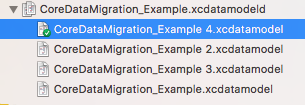
The green tick indicates which version is currently being developed against.
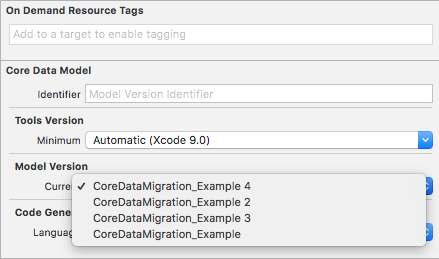
To change the current version, you would switch the Model Version value shown below:
With this ability to evolve the model over time, we also need to handle migrating the user's data from one model version to another. This is handled by creating a mapping model between those two versions. By default, in iOS, the migration process is completed in one step from source to destination models, so if we support four versions, mapping models would exist for 1 to 4, 2 to 4 and 3 to 4. While this approach is the most efficient (in terms of processing and migration time), it is also the most developer- and tester-heavy. With each new destination model, we need to redo all the paths between those models. So if we introduce version 5, we now need to handle 1 to 5, 2 to 5, 3 to 5 and 4 to 5 - as you can see, there is no reuse from the previous migration paths. For each new version, you must add n-1 new mappings. The need for these new mappings leads to a lot of work for each new version of the model we introduce. Or all that extra work may convince us to prematurely drop support for migrating from certain versions 😞.
Instead of following the default migration process, we will look at a system that performs migration over multiple steps, i.e. 1 to 2, 2 to 3, 3 to 4 and 4 to 5 - this means that for each new version of the model, we need only add one additional step.
But before we get into the technical details of our migration implementation, let's look at our migration options.
Core Data has two migration options:
- Lightweight - where Core Data is able to infer how to migrate from the source model to the destination model.
- Standard - where Core Data isn't able to infer how to migrate, and we have to detail the path by providing a custom mapping model
*.xcmappingmodeland/orNSEntityMigrationPolicysubclasses.
It's important to note that both
LightweightandStandardmigration techniques will produce a mapping model; it's just that inStandardthe mapping model is explicitly created and lives in the project as a*.xcmappingmodelfile.
Both Lightweight and Standard migration techniques can be achieved automatically or manually. By default, with NSPersistentContainer, Core Data will first try to use an explicit mapping model (Standard migration); if no suitable mapping model is found, it falls back to inferring the mapping automatically (Lightweight migration).
When performing step-by-step migrations, we will use the same tools but repurpose them for our needs.
Before writing any migration code, you first need to answer this question:
"Do I need to bother with migration?"
Seriously, just because you use Core Data in your project does not mean that you need to care about migrating the data stored there. If you only use Core Data as a local cache and always override it with the content you get from an API response, you probably don't need to go through the effort of migrating from one version to another. Just delete the local
.sqlitefiles and recreate your Core Data stack, populating that new model with calls to the API.If that applies to you, you can stop reading now if you want or continue on with a certain smugness knowing that the difficulties being described below do not relate to you 😜.
Looking at What We Need to Build
To perform a step-by-step migration, we have to answer a few questions:
- What is a Step?
- How do we group steps?
- Who's responsible for triggering the migration?
The following types will answer these questions:
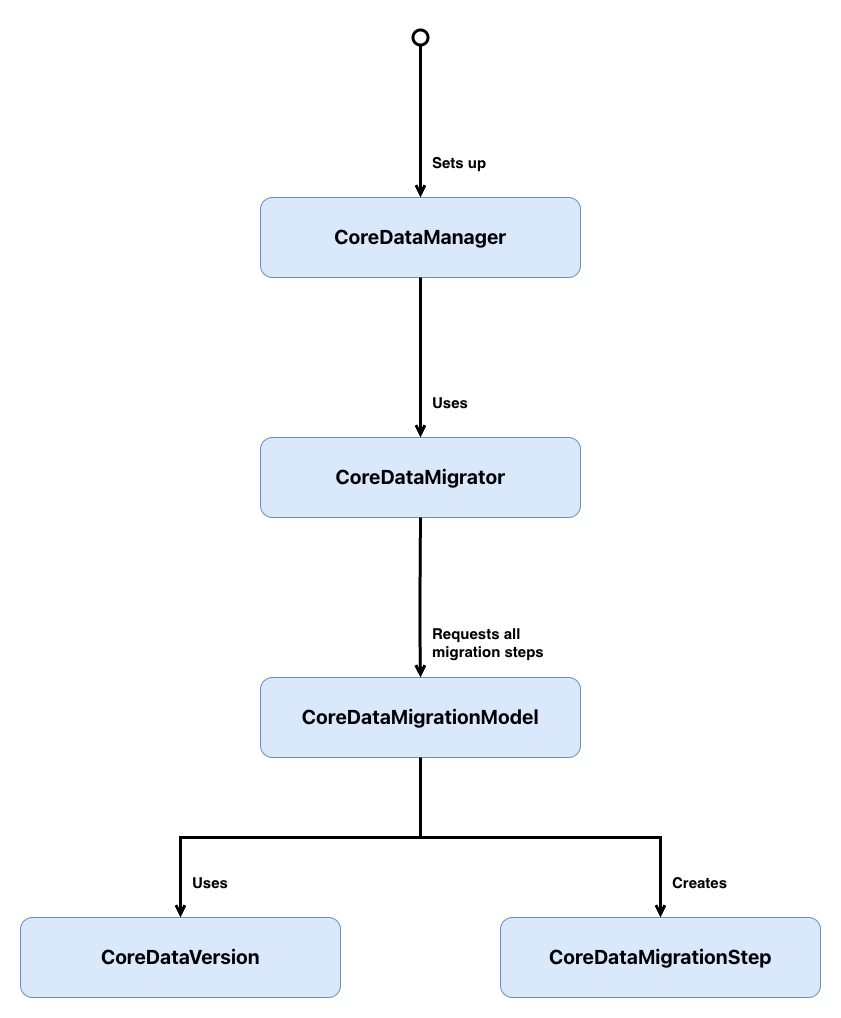
CoreDataManagersets up the Core Data stack and acts as the entry point for migrations. Before loading the persistent store, it checks whether a migration is needed and, if so, hands the work off toCoreDataMigrator.CoreDataMigratororchestrates the migration process. It determines whether a migration is required by comparing the persistent store's metadata against the current model, forces WAL checkpointing to ensure data integrity, builds the full migration path from source to destination, and then iterates through each step - writing intermediate results to temporary stores before replacing the original.CoreDataMigrationModelrepresents a single model version and knows how to load its associatedNSManagedObjectModelfrom the bundle. It determines which version comes next and whether the mapping to that successor version should be inferred (lightweight) or loaded from a customxcmappingmodel(standard).CoreDataMigrationStepis a simple value type that holds the three pieces needed to perform a single migration: the sourceNSManagedObjectModel, the destinationNSManagedObjectModel, and theNSMappingModelthat maps between them.CoreDataVersionis an enum that represents all the possible Core Data model versions.
Don't worry if that doesn't all make sense yet; we will look into each type in greater depth below.
Step-by-Step Migrations
1. What Is a Step?
struct CoreDataMigrationStep {
    let source: NSManagedObjectModel
    let destination: NSManagedObjectModel
    let mapping: NSMappingModel
}
A CoreDataMigrationStep is a migration between two versions of the model: source and destination, and the actual mapping model itself that gets our data from the current source model to the destination model.
It's possible to have multiple mapping models between versions (this can be especially useful when migrating large data sets). In this post, in an attempt to keep things simple, I assume only one mapping model, but if you need to support multiple mappings, you would transform the
mappingproperty into an array.
2. How Do We Group Steps?
First, let's create a representation of what a model version is:
// 1
enum CoreDataVersion: String, CaseIterable {
    case version1 = "CoreDataMigration_Example"

    // 2
    static var latest: CoreDataVersion {
        return allCases.last!
    }
}
Here's what we did above:
CoreDataVersionis aStringbacked enum where each case maps to a model version in the*.xcdatamodeldpackage - providing a type-safe representation of those versions. It conforms toCaseIterableto allow its cases to be treated as an array.latestreturns the most recent version by grabbing the last element fromallCases.
CoreDataMigration_Examplewill need to be updated to match your project needs.
We can now create a migration path from the source model to the destination model via CoreDataMigrationModel.
The first thing we need to do is determine which Core Data model version is the next step from the current source model:
class CoreDataMigrationModel {
    // 1
    let version: CoreDataVersion

    // 2
    var successor: CoreDataMigrationModel? {
        switch self.version {
        case .version1:
            return nil
        }
    }

    init(version: CoreDataVersion) {
        self.version = version
    }
}
versionstores whichCoreDataVersionthis model represents.successordetermines the next model version to migrate to. As new versions are added, this switch will map each version to its successor, forming the step-by-step migration chain.
As we only have one model at the moment, the implementation of successor is simple, but eventually it could end up with something like:
class CoreDataMigrationModel {
    // Omitted other functionality

    var successor: CoreDataMigrationModel? {
        switch self.version {
        case .version1:
            return CoreDataMigrationModel(version: .version2)
        case .version2:
            return CoreDataMigrationModel(version: .version3)
        case .version3:
            return CoreDataMigrationModel(version: .version4)
        case .version4:
            return nil
        }
    }
}
Now, you may be thinking that writing a switch statement here is overkill, and we could simplify this by always getting the next version up as the successor, but sadly, real life isn't always so perfect. I'm guessing you probably found this post after tiring of maintaining single-step migrations, in which case you have existing migration paths. You don't need to throw away those existing migration paths - fold them into the above implementation and then start step-by-step migration from whatever version the single-step migration left you on. The successor implementation allows us to handle that situation gracefully:
var successor: CoreDataMigrationModel? {
    switch self.version {
    case .version1:
        return CoreDataMigrationModel(version: .version3) // single-step migration
    case .version2:
        return CoreDataMigrationModel(version: .version3) // single-step migration
    case .version3:
        return CoreDataMigrationModel(version: .version4) // step-by-step migration starts here
    case .version4:
        return nil
    }
}
Sometimes we ship broken code;
successoralso allows us to skip over a broken model version to limit any data corruption that version might have introduced.
With this flexibility, we are explicitly defining the migration graph instead of assuming linear versioning.
Before actually creating that migration path from the source model, we need a way to load the model files from the bundle:
class CoreDataMigrationModel {
    // Omitted other functionality

    // 1
    func managedObjectModel() -> NSManagedObjectModel {
        let omoURL = Bundle.main.url(forResource: version.rawValue,
                                     withExtension: "omo",
                                     subdirectory: "CoreDataMigration_Example.momd") // optimised model file

        let momURL = Bundle.main.url(forResource: version.rawValue,
                                     withExtension: "mom",
                                     subdirectory: "CoreDataMigration_Example.momd")

        guard let url = omoURL ?? momURL else {
            fatalError("Unable to find model in bundle")
        }

        guard let model = NSManagedObjectModel(contentsOf: url) else {
            fatalError("Unable to load model in bundle")
        }

        return model
    }
}
managedObjectModel()loads theNSManagedObjectModelfor this version from the bundle. It first looks for an optimised*.omofile, falling back to the standard*.momfile. If neither can be found or loaded, it fails fast with a fatal error.
As we know, migrations can take two forms, so let's add support for resolving both types of mapping:
class CoreDataMigrationModel {
    // Omitted other functionality

    // 1
    func mappingModelToSuccessor() -> NSMappingModel? {
        guard let nextVersion = successor else {
            return nil
        }

        return customMappingModel(to: nextVersion) ?? inferredMappingModel(to: nextVersion)
    }

    // 2
    func customMappingModel(to nextVersion: CoreDataMigrationModel) -> NSMappingModel? {
        let sourceModel = managedObjectModel()
        let destinationModel = nextVersion.managedObjectModel()

        return NSMappingModel(from: [Bundle.main],
                              forSourceModel: sourceModel,
                              destinationModel: destinationModel)
    }

    // 3
    func inferredMappingModel(to nextVersion: CoreDataMigrationModel) -> NSMappingModel {
        do {
            let sourceModel = managedObjectModel()
            let destinationModel = nextVersion.managedObjectModel()

            return try NSMappingModel.inferredMappingModel(forSourceModel: sourceModel,
                                                           destinationModel: destinationModel)
        } catch {
            fatalError("Unable to generate inferred mapping model")
        }
    }
}
mappingModelToSuccessor()determines how to map from the current version to its successor. It first checks if a custom mapping exists in the bundle and, if not, falls back to asking Core Data to infer one.customMappingModel(to:)searches the app bundle for a*.xcmappingmodelfile that matches the source and destination models. This is used when the changes between versions are too complex for Core Data to infer - such as renaming properties or restructuring entities. Returnsnilif no matching mapping model is found.inferredMappingModel(to:)asks Core Data to figure out the mapping between the current version and the next version automatically. This works when the changes between versions follow the rules for lightweight migration. If Core Data can't infer the mapping, it fails fast with a fatal error.
All that's left to do is join those steps together into a step-by-step migration path:
class CoreDataMigrationModel {
    // Omitted other functionality

    func migrationSteps(to version: CoreDataMigrationModel) -> [CoreDataMigrationStep] {
        // 1
        guard self.version != version.version else {
            return []
        }

        // 2
        guard let mapping = mappingModelToSuccessor(),
              let nextVersion = successor else {
            return []
        }

        let sourceModel = managedObjectModel()
        let destinationModel = nextVersion.managedObjectModel()

        // 3
        let step = CoreDataMigrationStep(source: sourceModel,
                                         destination: destinationModel,
                                         mapping: mapping)
        let nextStep = nextVersion.migrationSteps(to: version)

        return [step] + nextStep
    }
}
- If the current version already matches the target version, no migration is needed - return an empty array.
- Retrieve the mapping model and successor version for the current version. If either is
nil, the chain has reached its end - return an empty array. - Create a
CoreDataMigrationStepfrom the current version to its successor, then recursively callmigrationSteps(to:)on the successor to build the remaining steps. The result is a flat array containing every step needed to reach the target version.
Before moving on, we'll add some convenience functionality to make it easier to work with CoreDataMigrationModel:
class CoreDataMigrationModel {
    // Omitted other functionality

    // 1
    static var all: [CoreDataMigrationModel] {
        return CoreDataVersion.allCases.map { CoreDataMigrationModel(version: $0) }
    }

    // 2
    static var current: CoreDataMigrationModel {
        return CoreDataMigrationModel(version: CoreDataVersion.latest)
    }

    // 3
    static func migrationModelCompatibleWithStoreMetadata(_ metadata: [String: Any]) -> CoreDataMigrationModel? {
        let compatibleMigrationModel = CoreDataMigrationModel.all.first {
            $0.managedObjectModel().isConfiguration(withName: nil,
                                                    compatibleWithStoreMetadata: metadata)
        }

        return compatibleMigrationModel
    }
}
allwraps everyCoreDataVersioncase in aCoreDataMigrationModel, giving a complete list of all known model versions.currentreturns theCoreDataMigrationModelfor the latest version - this is the migration target.migrationModelCompatibleWithStoreMetadata(_:)finds whichCoreDataMigrationModelmatches the on-disk store's metadata, used to determine the starting point for migration.
3. Who's Responsible for Triggering the Migration?
OK, so we've looked at how the steps are created and how each step knows which mapping model will move it to its successor. Now, we are going to look at how those steps are called and how we prepare the app for a migration to occur. First, we need to determine if a migration is required:
class CoreDataMigrator {

    // 1
    func requiresMigration(at storeURL: URL) -> Bool {
        guard let metadata = NSPersistentStoreCoordinator.metadata(at: storeURL) else {
            return false
        }

        return !CoreDataMigrationModel.current.managedObjectModel().isConfiguration(withName: nil,
                                                                                    compatibleWithStoreMetadata: metadata)
    }
}
requiresMigration(at:)loads the metadata from the persistent store on disk and checks whether it's compatible with the current model version. If the metadata can't be loaded, it assumes no migration is needed. If the store's metadata doesn't match the current model, a migration is required.
With the ability to check if a migration is needed or not, let's add in the code to perform a migration:
class CoreDataMigrator {
    // Omitted other functionality

    // 1
    func migrateStore(at storeURL: URL) {
        migrateStore(from: storeURL,
                     to: storeURL,
                     targetVersion: CoreDataMigrationModel.current)
    }

    // 2
    func migrateStore(from sourceURL: URL,
                      to targetURL: URL,
                      targetVersion: CoreDataMigrationModel) {
        guard let metadata = NSPersistentStoreCoordinator.metadata(at: sourceURL),
              let sourceMigrationModel = CoreDataMigrationModel.migrationModelCompatibleWithStoreMetadata(metadata) else {
            fatalError("Unknown store version at URL \(sourceURL)")
        }

        forceWALCheckpointingForStore(at: sourceURL)

        var currentURL = sourceURL
        let migrationSteps = sourceMigrationModel.migrationSteps(to: targetVersion)

        for step in migrationSteps {
            let manager = NSMigrationManager(sourceModel: step.source,
                                             destinationModel: step.destination)
            let tmpDirectoryURL = URL(fileURLWithPath: NSTemporaryDirectory(),
                                      isDirectory: true)
            let destinationURL = tmpDirectoryURL.appendingPathComponent(UUID().uuidString)

            do {
                try manager.migrateStore(from: currentURL,
                                         sourceType: NSSQLiteStoreType,
                                         options: nil,
                                         with: step.mapping,
                                         toDestinationURL: destinationURL,
                                         destinationType: NSSQLiteStoreType,
                                         destinationOptions: nil)
            } catch let error {
                fatalError("Failed attempting to migrate from \(step.source) to \(step.destination), error: \(error)")
            }

            if currentURL != sourceURL {
                // Destroy intermediate step's store
                NSPersistentStoreCoordinator.destroyStore(at: currentURL)
            }

            currentURL = destinationURL
        }

        NSPersistentStoreCoordinator.replaceStore(at: targetURL,
                                                  withStoreAt: currentURL)

        if currentURL != sourceURL {
            NSPersistentStoreCoordinator.destroyStore(at: currentURL)
        }
    }

    // 3
    private func forceWALCheckpointingForStore(at storeURL: URL) {
        guard let metadata = NSPersistentStoreCoordinator.metadata(at: storeURL),
              let migrationModel = CoreDataMigrationModel.migrationModelCompatibleWithStoreMetadata(metadata) else {
            return
        }

        do {
            let model = migrationModel.managedObjectModel()
            let persistentStoreCoordinator = NSPersistentStoreCoordinator(managedObjectModel: model)

            let options = [NSSQLitePragmasOption: ["journal_mode": "DELETE"]]
            let store = persistentStoreCoordinator.addPersistentStore(at: storeURL,
                                                                      options: options)
            try persistentStoreCoordinator.remove(store)
        } catch let error {
            fatalError("Failed to force WAL checkpointing, error: \(error)")
        }
    }
}
migrateStore(at:)is a convenience method that triggers a migration from the store's current version to the latest version, using the same URL as both source and target.migrateStore(from:to:targetVersion:)is where the actual migration happens. It first identifies which model version the on-disk store matches, then forces a WAL checkpoint to ensure all pending transactions are committed. It builds the full list of migration steps and iterates through them - each step writes to a temporary SQLite file rather than overwriting the original, so that if something goes wrong mid-migration, the original data is still intact (this is extremely useful during development). After each intermediate step, the previous temporary store is destroyed to avoid leaving orphaned files. Once all steps are completed successfully, the final temporary store replaces the original.forceWALCheckpointingForStore(at:)handles a subtle but important detail. Since iOS 7, Core Data has used WAL (Write-Ahead Logging) journaling by default, which means uncommitted transactions can sit in a separate-walfile. If we migrate without first flushing those transactions into the main SQLite file, that data can be lost. This method forces a checkpoint by temporarily opening the store withjournal_modeset toDELETE, which commits everything in the-walfile. An important detail to note is that we load the model version that matches the on-disk store - not the latest model - because the store and its WAL file are in the old format.
In the above class, we've seen a number of methods used that are not part of the standard NSPersistentStoreCoordinator API, so I've included the extension that contains these methods below. As with most extensions, the methods are used to reduce boilerplate code.
extension NSPersistentStoreCoordinator {
    // 1
    static func destroyStore(at storeURL: URL) {
        do {
            let persistentStoreCoordinator = NSPersistentStoreCoordinator(managedObjectModel: NSManagedObjectModel())
            try persistentStoreCoordinator.destroyPersistentStore(at: storeURL,
                                                                  ofType: NSSQLiteStoreType,
                                                                  options: nil)
        } catch let error {
            fatalError("Failed to destroy persistent store at \(storeURL), error: \(error)")
        }
    }

    // 2
    static func replaceStore(at targetURL: URL,
                             withStoreAt sourceURL: URL) {
        do {
            let persistentStoreCoordinator = NSPersistentStoreCoordinator(managedObjectModel: NSManagedObjectModel())
            try persistentStoreCoordinator.replacePersistentStore(at: targetURL,
                                                                  destinationOptions: nil,
                                                                  withPersistentStoreFrom: sourceURL,
                                                                  sourceOptions: nil,
                                                                  ofType: NSSQLiteStoreType)
        } catch let error {
            fatalError("Failed to replace persistent store at \(targetURL) with \(sourceURL), error: \(error)")
        }
    }

    // 3
    static func metadata(at storeURL: URL) -> [String : Any]? {
        return try? NSPersistentStoreCoordinator.metadataForPersistentStore(ofType: NSSQLiteStoreType,
                                                                            at: storeURL,
                                                                            options: nil)
    }

    // 4
    func addPersistentStore(at storeURL: URL,
                            options: [AnyHashable : Any]) -> NSPersistentStore {
        do {
            return try addPersistentStore(ofType: NSSQLiteStoreType,
                                          configurationName: nil,
                                          at: storeURL,
                                          options: options)
        } catch let error {
            fatalError("Failed to add persistent store to coordinator, error: \(error)")
        }
    }
}
destroyStore(at:)deletes the persistent store and its associated files (including-waland-shm) at the given URL. Used to clean up intermediate temporary stores during step-by-step migration.replaceStore(at:withStoreAt:)atomically replaces the persistent store at the target URL with the one at the source URL. Used at the end of migration to swap the original store with the fully migrated temporary store.metadata(at:)loads the metadata dictionary for the persistent store at the given URL. Returnsnilif the metadata can't be read, rather than throwing.addPersistentStore(at:options:)adds a persistent store to the coordinator with the given options, wrapping the throwing API in a fail-fast fatal error. Used during WAL checkpointing to temporarily open the store.
Connecting the Migrator to the Stack
Now that migrations are possible, we need to set up our Core Data stack:
class CoreDataManager {

    // 1
    lazy var persistentContainer: NSPersistentContainer = {
        let persistentContainer = NSPersistentContainer(name: "CoreDataMigration_Example")

        let description = persistentContainer.persistentStoreDescriptions.first
        description?.shouldInferMappingModelAutomatically = false

        return persistentContainer
    }()

    // 2
    lazy var backgroundContext: NSManagedObjectContext = {
        let context = self.persistentContainer.newBackgroundContext()
        context.mergePolicy = NSMergeByPropertyObjectTrumpMergePolicy

        return context
    }()

    // 3
    lazy var mainContext: NSManagedObjectContext = {
        let context = self.persistentContainer.viewContext
        context.automaticallyMergesChangesFromParent = true

        return context
    }()

    // 4
    static let shared = CoreDataManager()

    // 5
    func setup(completion: @escaping () -> Void) {
        loadPersistentStore(completion: completion)
    }

    // 6
    private func loadPersistentStore(completion: @escaping () -> Void) {
        persistentContainer.loadPersistentStores { description, error in
            guard error == nil else {
                fatalError("Unable to load store \(error!)")
            }

            completion()
        }
    }
}
persistentContainercreates anNSPersistentContainerwhich simplifies the setup of the managed object model, persistent store coordinator and managed object contexts into a single object.shouldInferMappingModelAutomaticallyis set tofalseas ourCoreDataMigrationModelclass will handle setting the correct mapping model approach on eachCoreDataMigrationStep.backgroundContextcreates a context for performing Core Data operations off the main thread. Its merge policy is set toNSMergeByPropertyObjectTrumpMergePolicy, which means in-memory changes win over on-disk values when a conflict occurs.mainContextprovides a context tied to the main thread for driving the UI. SettingautomaticallyMergesChangesFromParenttotruemeans it will automatically pick up changes saved to the parent store by other contexts - such asbackgroundContext.sharedmakesCoreDataManagera singleton, providing a single point of access to the Core Data stack throughout the app.setup(completion:)is the entry point for initialising the Core Data stack. It loads the persistent store asynchronously and calls the completion handler once it's ready.loadPersistentStore(completion:)asks the persistent container to load its stores. If loading fails, it fails fast with a fatal error - as Core Data is so central to the app, there's no point trying to recover.
With our Core Data stack set up, let's add support for migrating:
class CoreDataManager {
    // Omitted other functionality

    // 1
    let migrator: CoreDataMigrator

    // 2
    init(migrator: CoreDataMigrator = CoreDataMigrator()) {
        self.migrator = migrator
    }

    private func loadPersistentStore(completion: @escaping () -> Void) {
        // 3
        migrateStoreIfNeeded {
            self.persistentContainer.loadPersistentStores { description, error in
                guard error == nil else {
                    fatalError("Unable to load store \(error!)")
                }

                completion()
            }
        }
    }

    // 4
    private func migrateStoreIfNeeded(completion: @escaping () -> Void) {
        guard let storeURL = persistentContainer.persistentStoreDescriptions.first?.url else {
            fatalError("persistentContainer was not set up properly")
        }

        if migrator.requiresMigration(at: storeURL) {
            DispatchQueue.global(qos: .userInitiated).async {
                self.migrator.migrateStore(at: storeURL)

                DispatchQueue.main.async {
                    completion()
                }
            }
        } else {
            completion()
        }
    }
}
migratorstores an instance ofCoreDataMigratoras a property, giving the manager access to the migration logic.init(migrator:)injects the migrator with a default value, which makes it easy to substitute a different migrator during unit testing.loadPersistentStore(completion:)now callsmigrateStoreIfNeeded(completion:)before loading the persistent stores - ensuring any pending migration is completed before the stack is used.migrateStoreIfNeeded(completion:)checks whether the on-disk store needs migrating. If it does, the migration is performed on a background queue to avoid blocking the main thread, with the completion handler dispatched back to the main queue once finished. If no migration is needed, the completion handler is called immediately. Again, we have opted for a fail fast approach with a fatal error.
Our App
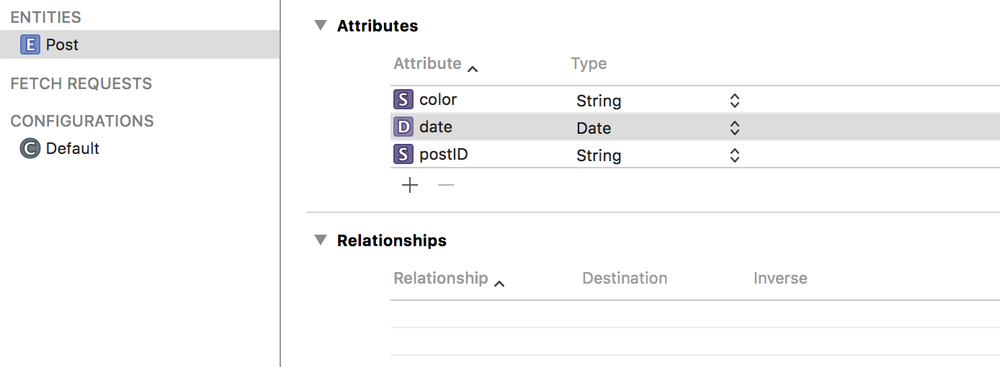
Let's pretend we have written a lovely note-taking app that stores each note you write in Core Data. Our model consists of a single entity Post with 3 properties:
postIDcolordate
From v1 to v2
So we release the app (with version1 of the model) and our users ❤️ it.
Of course - you did a great job!
Due to this success, we hire a new developer. In their first week, they mistake the information stored in the color property on Post to be a representation of a colour as an RGB string (when in fact it is represented as a hex string), which leads to the app crashing 😞. To stop this issue from happening when we hire more developers, we decide to rename that property to hexColor. Now this is a change to the model, which means a new model version, which will result in a migration.
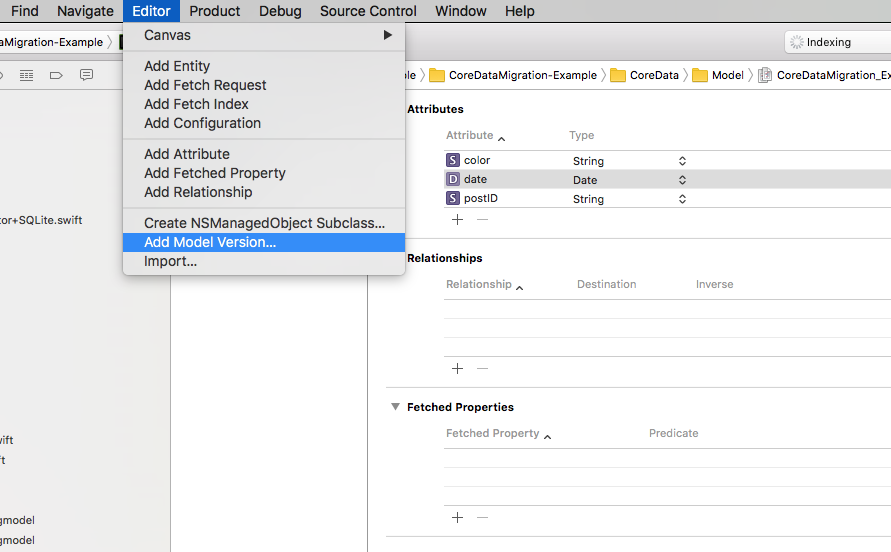
I would suggest keeping it the same name and adding a number to it, so
CoreDataMigration_Example 2.
So now we have two models, and we can freely edit the model's structure within CoreDataMigration_Example 2.
When it comes to renaming color to hexColor, we have two options:
canonical name*.xcmappingmodel
A canonical name effectively acts as a bridge between what that property used to be called and what it is now called. You would set the canonical name in the renaming identifier of that property. However, here we are going to use *.xcmappingmodel.
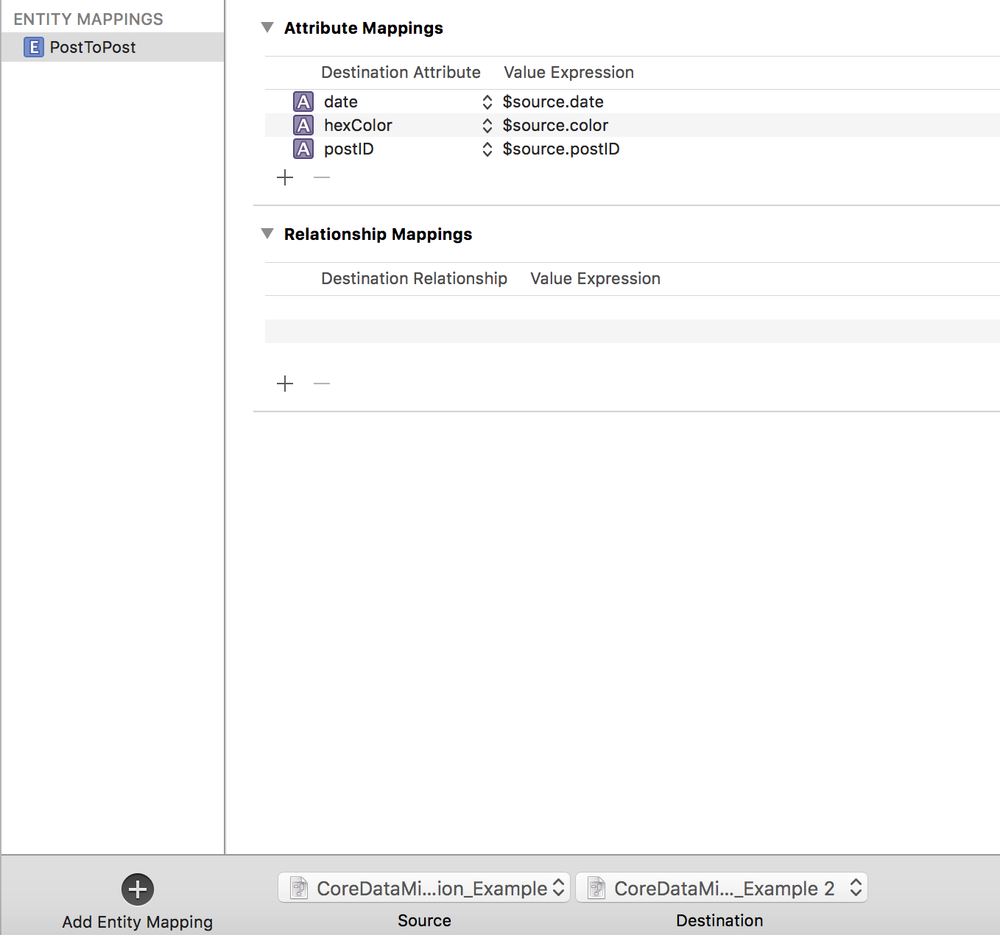
As you see in the above screenshot, we have created a custom mapping between CoreDataMigration_Example (effectively version 1) and CoreDataMigration_Example 2. As mentioned above, we have created a custom mapping because we have renamed a property color to hexColor, and Core Data isn't able to infer that these properties are the same. With this mapping, we are telling Core Data that the new hexColor property should be mapped to the old color property by: $source.color.
We can now add a version2 case to CoreDataVersion and update CoreDataMigrationModel to migrate from version1 to version2:
enum CoreDataVersion: String, CaseIterable {
    // Omitted other cases
    case version2 = "CoreDataMigration_Example 2"

    // Omitted other functionality
}

class CoreDataMigrationModel {
    // Omitted other functionality

    var successor: CoreDataMigrationModel? {
        switch self.version {
        case .version1:
            return CoreDataMigrationModel(version: .version2)
        case .version2:
            return nil
        }
    }
}
With that change, when the updated app is next launched, the migration will be triggered, and our users will be using hexColor. 🎉 🎉 🎉
Woohoo! That's us at the end of migrating from version1 to version2 of our model. It was a lot to take in, but trust me, it will get much easier to perform future migrations now that we've implemented this step-by-step approach.
From v2 to v3
While the migration from version1 to version2 was a success, the new hexColor is still causing issues, so instead we decide to extract it out into its own entity: Color. This change will require us to create a new version CoreDataMigration_Example 3, which looks like:
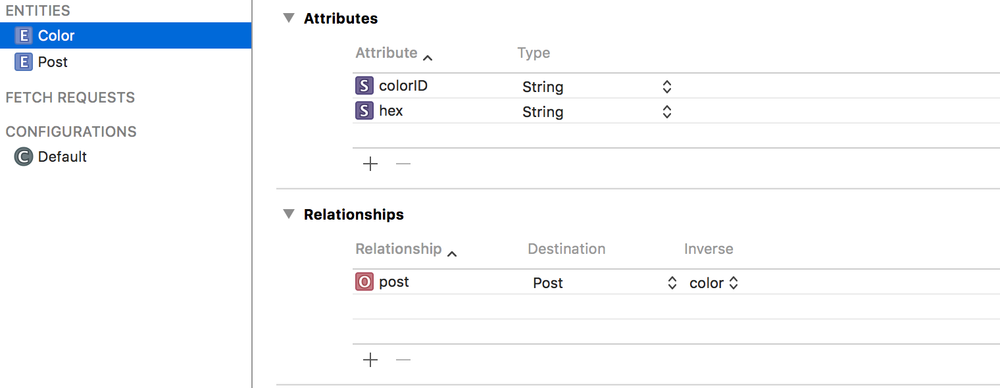
Now this migration is slightly trickier than from version1 to version2 and will require us to create not only an xcmappingmodel but also a custom NSEntityMigrationPolicy subclass.
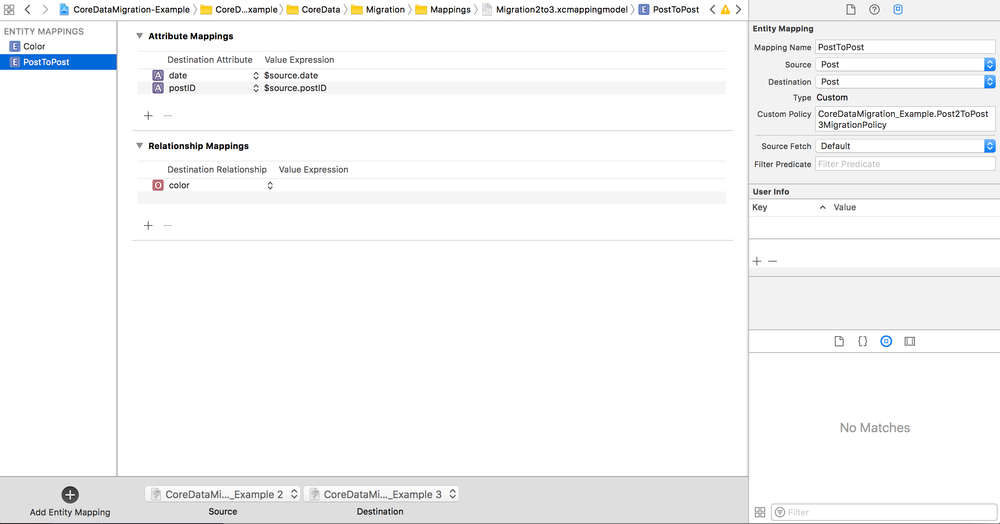
As you see in the above screenshot, we have created a custom mapping between CoreDataMigration_Example 2 and CoreDataMigration_Example 3. In version3, we have introduced a new entity Color which has taken the place of the previous hexColor property on the Post entity - you can see in the Custom Policy field we are using Post2ToPost3MigrationPolicy to handle migrating from this property to an entity.
final class Post2ToPost3MigrationPolicy: NSEntityMigrationPolicy {

    override func createDestinationInstances(forSource sInstance: NSManagedObject,
                                             in mapping: NSEntityMapping,
                                             manager: NSMigrationManager) throws {
        try super.createDestinationInstances(forSource: sInstance,
                                             in: mapping,
                                             manager: manager)

        guard let destinationPost = manager.destinationInstances(forEntityMappingName: mapping.name,
                                                                 sourceInstances: [sInstance]).first else {
            fatalError("Expected a post")
        }

        let color = NSEntityDescription.insertNewObject(forEntityName: "Color",
                                                        into: destinationPost.managedObjectContext!)
        color.setValue(UUID().uuidString,
                       forKey: "colorID")
        color.setValue(sInstance.value(forKey: "hexColor"),
                       forKey: "hex")

        destinationPost.setValue(color,
                                 forKey: "color")
    }
}
One interesting point to note is that we are dealing with NSManagedObject rather than our custom NSManagedObject subclasses. This is because Core Data wouldn't know which version of Post to load. So to work with both representations of the data, we need to use KVC to get and set properties.
Next, we need to introduce a version3 case to CoreDataVersion and update our CoreDataMigrationModel class to handle migrating from version2 to version3:
enum CoreDataVersion: String, CaseIterable {
    // Omitted other cases
    case version3 = "CoreDataMigration_Example 3"

    // Omitted other functionality
}

class CoreDataMigrationModel {
    // Omitted other functionality

    var successor: CoreDataMigrationModel? {
        switch self.version {
        case .version1:
            return CoreDataMigrationModel(version: .version2)
        case .version2:
            return CoreDataMigrationModel(version: .version3)
        case .version3:
            return nil
        }
    }
}
From v3 to v4
The success of our app knows no bounds, and we have decided to add the ability to hide posts that have been seen. We want to store this hidden value in our model. So we need to add a new version CoreDataMigration_Example 4. The good news here is that, as this change involves adding properties to our model rather than transforming an existing entity, we can use the inferred mapping approach. This means that we need to make even fewer code changes than when we migrated from version2 to version3:
enum CoreDataVersion: String, CaseIterable {
    // Omitted other cases
    case version4 = "CoreDataMigration_Example 4"

    // Omitted other functionality
}

class CoreDataMigrationModel {
    // Omitted other functionality

    var successor: CoreDataMigrationModel? {
        switch self.version {
        case .version1:
            return CoreDataMigrationModel(version: .version2)
        case .version2:
            return CoreDataMigrationModel(version: .version3)
        case .version3:
            return CoreDataMigrationModel(version: .version4)
        case .version4:
            return nil
        }
    }
}
And that's it.
Making Sure It Actually Migrates
We're dealing with user data here - if this goes wrong, we don't get a crash, we get data loss. So let's look at how we test that it's possible to migrate from version3 to version4:
class CoreDataMigratorTests: XCTestCase {
    // Omitted other tests

    func test_givenVersion3Store_whenMigratingStore_thenStoreIsUpdated() {
        // 1
        let storeURL = CoreDataMigratorTests.moveFileFromBundleToTmpDirectory(fileName: "CoreDataMigration_Example_3.sqlite")

        // 2
        let modifiedDateBeforeMigration = try! FileManager.default.attributesOfItem(atPath: storeURL.path)[FileAttributeKey.modificationDate] as! Date

        // 3
        sut.migrateStore(at: storeURL)

        // 4
        let modifiedDateAfterMigration = try! FileManager.default.attributesOfItem(atPath: storeURL.path)[FileAttributeKey.modificationDate] as! Date

        // 5
        XCTAssertTrue(FileManager.default.fileExists(atPath: storeURL.path))
        XCTAssertTrue(modifiedDateAfterMigration.timeIntervalSince(modifiedDateBeforeMigration) > 0)
    }
}
- Copy a pre-populated
version3SQLite file from the test bundle into a temporary directory so the test has a known starting state to migrate from. - Record the file's modification date before migration - this gives us a baseline to verify that the migration actually touched the file.
- Perform the migration from
version3toversion4. - Record the file's modification date after migration.
- Assert that the SQLite file still exists at the target path and that its modification date has changed - confirming the migration ran and produced output.
To see the full testing suite, visit the repository.
We Made It! 🏁
The default Core Data migration approach required n-1 new mappings for every new model version - a burden that grows with every release and tempts us into dropping support for older versions. With the above step-by-step approach, adding support for migrating to a new version only costs us a single step. Breaking the migration work down into a series of small steps takes a lot of the difficulty out of migrations.
And remember, if that's how someone on the bus reacts to having to move their bag, we should try and spare this person the trauma that losing their unlocked thingamabobs would surely cause 😉.
To see the complete working example, visit the repository and clone the project.
I want to acknowledge that I leaned on the most excellent Core Data book by Florian Kugler and Daniel Eggert, which you can get here. I highly recommend that you give that book a read, as it's a treasure trove of Core Data knowledge.