Consuming a SOAP Web Service in Layers
You've just been tasked with connecting to a SOAP web service and retrieving the user details that the rest of the app can then use. Between you and that User sit several distinct steps: making the connection, receiving the data, parsing the XML, and assembling the model.
In this post, we'll apply a separation of concerns - giving each of those steps its own component: a service call layer, a parser, and a factory - with a coordinator to wire them together so that each one only knows about its own job.

Looking at each component
Before jumping into the code, let's look at the different components and how they will interact:
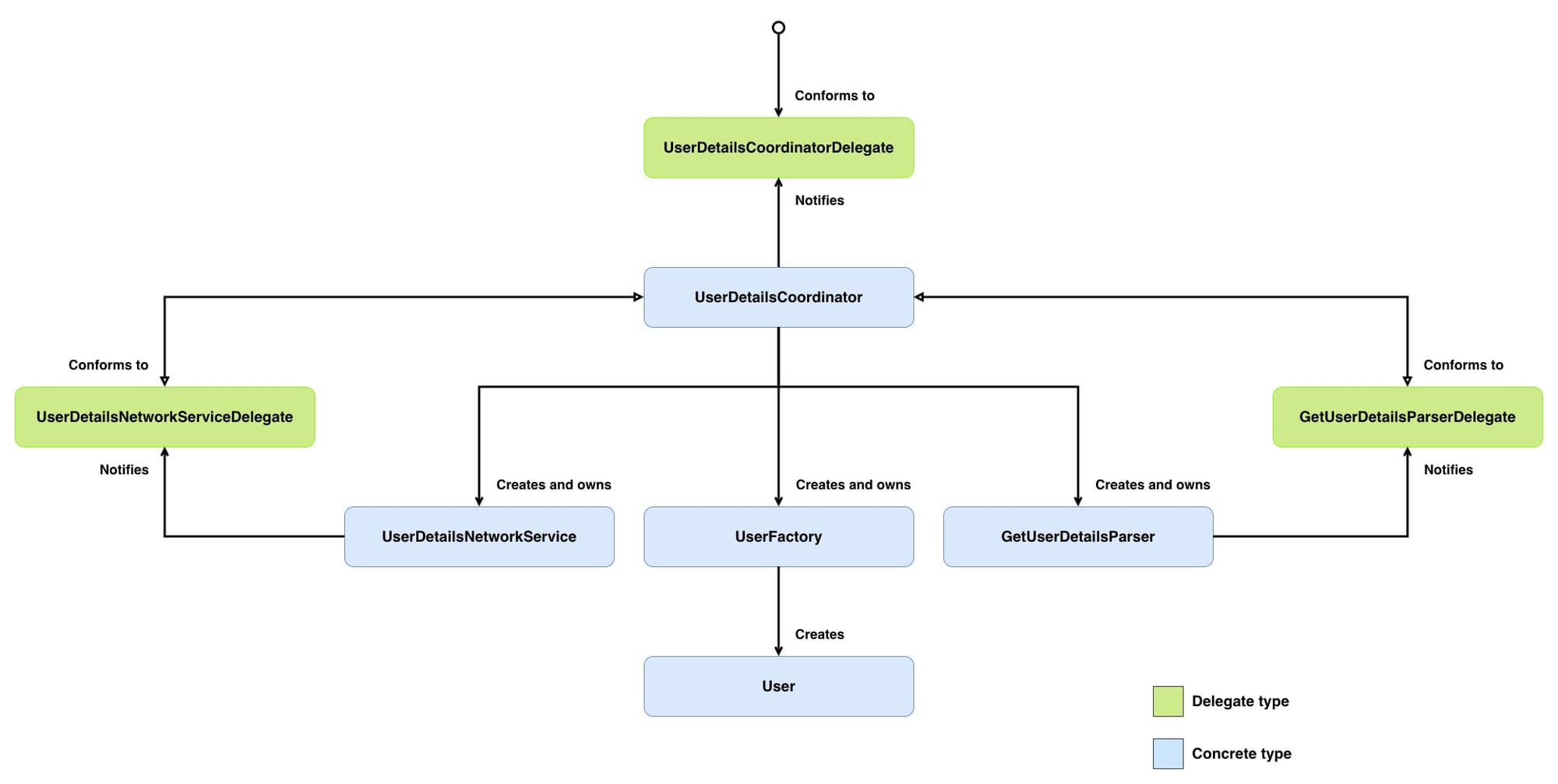
UserDetailsCoordinator- owns and wires everything together. It creates the network service, parser, and factory, then drives the flow: fetch -> parse -> build. It conforms to bothUserDetailsNetworkServiceDelegateandGetUserDetailsParserDelegate, acting as the single point where data moves between components. Reports the finishedUser(or failure) to itsUserDetailsCoordinatorDelegate.UserDetailsCoordinatorDelegate- the contract between the coordinator and the UI. It defines two methods: one for when aUserhas been successfully fetched and assembled, and one for when something went wrong (We won't see anything conform toUserDetailsCoordinatorDelegateas that is outside of the scope of this post).UserDetailsNetworkService- makes the SOAP request viaNSURLConnection, accumulates the response data by conforming toNSURLConnectionDelegate, and reports the outcome to itsUserDetailsNetworkServiceDelegate.UserDetailsNetworkServiceDelegate- the contract between theUserDetailsNetworkServiceandUserDetailsCoordinator. It defines two methods: one for when data has been fully received, and one for when the connection fails.GetUserDetailsParser- takes rawNSData, feeds it to anNSXMLParserinstance, and walks through the XML collecting element values into a dictionary by conforming toNSXMLParserDelegate. When parsing completes, it reports the result to itsGetUserDetailsParserDelegate.GetUserDetailsParserDelegate- the contract betweenGetUserDetailsParserandUserDetailsCoordinator. It defines two methods: one for when parsing finishes successfully with a dictionary, and one for when parsing fails.UserFactory- builds theUsermodel from a parsed XML dictionary.User- the model object.
Don't worry if that doesn't all make sense yet; we will look into each class in greater depth below.
The code below will prefix using
SWS- I haven't included the prefix in the diagram above to make the diagram easier to read by being less cluttered.
Getting to know the web service
Before we can start coordinating the fetching, parsing, and building, we first need to get to know our SOAP web service.
SOAP (Simple Object Access Protocol) is a protocol for exchanging structured information between systems over a network, using XML as its message format. A SOAP web service exposes operations, e.g. getFeed, getUserDetails, etc., that a client can call remotely. The entire conversation (request and response) is wrapped in XML envelopes with a specific structure:
Envelope- the root element that says "this is a SOAP message".Header- metadata like authentication tokens. This is optional.Body- the actual payload, containing either the request parameters or the response data.
A typical exchange looks like this: your app constructs an XML SOAP request, sends it via HTTP POST to the service's endpoint, and gets back an XML SOAP response.
A request will look like this:
<?xml version="1.0" encoding="utf-8"?>
<soap:Envelope xmlns:soap="http://schemas.xmlsoap.org/soap/envelope/">
  <soap:Body>
    <getUserDetails>
      <userID>12345</userID>
    </getUserDetails>
  </soap:Body>
</soap:Envelope>
This is the SOAP request asking the web service to execute the getUserDetails operation for a specific user - the UserID field value will be replaced with the user that we want to fetch.
And a response will look like this:
<?xml version="1.0" encoding="utf-8" ?>
<soap:Envelope xmlns:soap="http://schemas.xmlsoap.org/soap/envelope/">
  <soap:Body>
    <getUserDetailsResponse>
      <getUserDetails>
        <userModel>
          <city>London</city>
          <email>fred.jones@example.com</email>
          <faxNumber>1234567891</faxNumber>
          <firstName>Fred</firstName>
          <lastName>Jones</lastName>
          <phoneNumber>1234567891</phoneNumber>
          <postCode>IG1 1YT</postCode>
          <street1>street1</street1>
          <street2>street2</street2>
        </userModel>
      </getUserDetails>
    </getUserDetailsResponse>
  </soap:Body>
</soap:Envelope>
This is the SOAP response to that getUserDetails request. It returns various user details that we will use to build the SWSUser data model.
Data Model
We will make our SWSUser model mirror the response structure:
@interface SWSUser : NSObject
{
}

@property (nonatomic, retain) NSString *city;
@property (nonatomic, retain) NSString *email;
@property (nonatomic, retain) NSString *faxNumber;
@property (nonatomic, retain) NSString *firstName;
@property (nonatomic, retain) NSString *lastName;
@property (nonatomic, retain) NSString *phoneNumber;
@property (nonatomic, retain) NSString *postCode;
@property (nonatomic, retain) NSString *street1;
@property (nonatomic, retain) NSString *street2;

@end

@implementation SWSUser

@synthesize city;
@synthesize email;
@synthesize faxNumber;
@synthesize firstName;
@synthesize lastName;
@synthesize phoneNumber;
@synthesize postCode;
@synthesize street1;
@synthesize street2;

- (void)dealloc
{
    [city release];
    [email release];
    [faxNumber release];
    [firstName release];
    [lastName release];
    [phoneNumber release];
    [postCode release];
    [street1 release];
    [street2 release];

    [super dealloc];
}

@end
Now that we have our request and response structures and a SWSUser model, let's implement how to make that SOAP request.
Network Layer
Before building SWSUserDetailsNetworkService, we need a way for it to communicate the outcome of the network call. We are going to use a delegate here so that SWSUserDetailsNetworkService can be used with any interested party without having to make any changes to SWSUserDetailsNetworkService:
@protocol SWSUserDetailsNetworkServiceDelegate

// 1
- (void)didFinishFetchingUserDetails:(NSData *)data;

// 2
- (void)didFailToFetchUserDetails;

@end
Here's what we did above:
didFinishFetchingUserDetails:passes along the data accumulated during the network call.didFailToFetchUserDetailspasses along that the network call failed.
Now that we know how to communicate the outcome of fetching the user's details, let's make that fetch:
// 1
@interface SWSUserDetailsNetworkService : NSObject <NSURLConnectionDelegate>
{
    // 2
    NSMutableData *xmlData;

    // 3
    NSURLConnection *urlConnection;
}

// 4
@property (nonatomic, assign) id <SWSUserDetailsNetworkServiceDelegate> networkServiceDelegate;

// 5
- (void)fetchUserDetails:(NSString *)userID;

@end
Here's what we did above:
SWSUserDetailsNetworkServiceconforms toNSURLConnectionDelegateso that it can handle the outcome of the network request.xmlDataas the response data comes in chunks, we use this to accumulate those chunks into one complete response.urlConnectionis a reference to the activeNSURLConnectioninstance. We hold onto this as an instance variable so that we can cancel it from outside the class if the user navigates away.networkServiceDelegateis the object that will receive the finished data once the connection completes. The delegate must conform toSWSUserDetailsNetworkServiceDelegate.fetchUserDetails:is the method to trigger the network request for fetching the user details.
Let's build out the implementation of SWSUserDetailsNetworkService, starting with fetchUserDetails::
@implementation SWSUserDetailsNetworkService

@synthesize networkServiceDelegate;

// 1
#define GET_USER_DETAILS_WEBSERVICE_URL @"https://example.com/services/UserService"

// 2
#define GET_USER_DETAILS_SOAP_ACTION @"getUserDetails"

// 3
#define GET_USER_DETAILS_SOAP_MESSAGE @"<?xml version=\"1.0\" encoding=\"utf-8\"?><soap:Envelope xmlns:soap=\"http://schemas.xmlsoap.org/soap/envelope/\"><soap:Body><getUserDetails><userID>%@</userID></getUserDetails></soap:Body></soap:Envelope>"

- (void)fetchUserDetails:(NSString *)userID
{
    // 4
    NSString *soapMessage = [NSString stringWithFormat:GET_USER_DETAILS_SOAP_MESSAGE, userID];

    // 5
    NSURL *url = [NSURL URLWithString:GET_USER_DETAILS_WEBSERVICE_URL];
    NSMutableURLRequest *request = [NSMutableURLRequest requestWithURL:url];
    NSString *msgLength = [NSString stringWithFormat:@"%d", [[soapMessage dataUsingEncoding:NSUTF8StringEncoding] length]];

    [request addValue:@"text/xml; charset=utf-8" forHTTPHeaderField:@"Content-Type"];
    [request addValue:GET_USER_DETAILS_SOAP_ACTION forHTTPHeaderField:@"SOAPAction"];
    [request addValue:msgLength forHTTPHeaderField:@"Content-Length"];
    [request setHTTPMethod:@"POST"];
    [request setHTTPBody:[soapMessage dataUsingEncoding:NSUTF8StringEncoding]];

    // 6
    urlConnection = [[NSURLConnection alloc] initWithRequest:request delegate:self];

    // 7
    if (!urlConnection)
    {
        [networkServiceDelegate didFailToFetchUserDetails];
    }
}

@end
Here's what we did above:
- The endpoint URL of the SOAP service.
- The operation name being called.
- A SOAP envelope XML string with a
%@placeholder where theuserIDcan be inserted. - Build the SOAP message by inserting the
userIDinto the XML message. - Configure the HTTP request: set the content type to XML, attach the SOAP action header, calculate the content length, set the method to POST, and place the SOAP message in the body.
- Create and start the connection. Unlike
NSURLSession, where creating a task and starting it are separate steps,initWithRequest:delegate:fires the request immediately. We passselfas the delegate so thatSWSUserDetailsNetworkServicereceives the connection delegate callbacks. - If the connection failed to initialise, notify
networkServiceDelegateof that failure.
Now that we can make a request, we need SWSUserDetailsNetworkService to respond to any events from NSURLConnectionDelegate:
@implementation SWSUserDetailsNetworkService

//Omitted other functionality

// 1
- (void)connection:(NSURLConnection *) connection didReceiveResponse:(NSURLResponse *) response
{
    if (xmlData == nil)
    {
        xmlData = [[NSMutableData alloc] init];
    }

    [xmlData setLength: 0];
}

// 2
- (void)connection:(NSURLConnection *) connection
    didReceiveData:(NSData *) data
{
    [xmlData appendData:data];
}

// 3
- (void)connection:(NSURLConnection *) connection didFailWithError:(NSError *) error
{
    [networkServiceDelegate didFailToFetchUserDetails];
    [urlConnection release];
    urlConnection = nil;
    [xmlData release];
    xmlData = nil;
}

// 4
- (void)connectionDidFinishLoading:(NSURLConnection *)connection
{
    [networkServiceDelegate didFinishFetchingUserDetails:xmlData];
    [urlConnection release];
    urlConnection = nil;
    [xmlData release];
    xmlData = nil;
}

@end
Here's what we did above:
- Called when the server first responds. We initialise
xmlDataif needed and reset its length to zero. The length reset handles the case where the server sends a redirect, which triggers a new response - without it, we'd end up with stale data from the previous response prepended to the real data. - Called potentially multiple times as chunks of the response body arrive. Each chunk is appended to
xmlData, gradually building up the complete response. - Called if the connection fails. We notify
networkServiceDelegateof that failure and clean up theivars. - Called when the response has been fully received. We notify
networkServiceDelegateof that successful request by giving it thexmlDatadata, and then we clean up theivars.
All that is left to do now is tidy up the state within SWSUserDetailsNetworkService, when it is released:
@implementation SWSUserDetailsNetworkService

//Omitted other functionality

- (void)dealloc
{
    [urlConnection release];
    urlConnection = nil;
    [xmlData release];
    xmlData = nil;

    [super dealloc];
}

@end
Now that we can send off a request and receive a response, let's build out who conforms to SWSUserDetailsNetworkServiceDelegate.
Coordinating
Like with SWSUserDetailsNetworkService, before defining SWSUserDetailsCoordinator, let's define how SWSUserDetailsCoordinator communicates the outcome of the fetch. We are going to use a delegate here so that SWSUserDetailsCoordinator can be used with any interested party without having to make any changes to SWSUserDetailsCoordinator:
@protocol SWSUserDetailsCoordinatorDelegate

// 1
- (void)didFetchUser:(SWSUser *)user;

// 2
- (void)didFailToFetchUser;

@end
Here's what we did above:
didFetchUser:- passes along theSWSUserinstance created by the fetch.didFailToFetchUser- passes along that the fetch failed.
Now that we know how to communicate the outcome of fetching, parsing, and building a user, let's build out the coordinator:
// 1
@interface SWSUserDetailsCoordinator : NSObject <SWSUserDetailsNetworkServiceDelegate>
{
    // 2
    SWSUserDetailsNetworkService *networkService;
}

// 3
@property (nonatomic, assign) id <SWSUserDetailsCoordinatorDelegate> coordinatorDelegate;

// 4
- (void)fetchUserDetails:(NSString *)userID;

@end
Here's what we did above:
SWSUserDetailsCoordinatorconforms toSWSUserDetailsNetworkServiceDelegateso that it can handle the outcome of the network request.networkServiceis the instance ofUserDetailsNetworkServicethat it will use to make the network request.SWSUserDetailsCoordinatoris responsible for keeping it alive.coordinatorDelegateis the object that will receive the finishedUser. The delegate must conform toSWSUserDetailsCoordinatorDelegate.fetchUserDetails:is the method to trigger fetching, parsing, and building a user.
Let's build out the implementation of SWSUserDetailsCoordinator, starting with fetchUserDetails::
@implementation SWSUserDetailsCoordinator

@synthesize coordinatorDelegate;

// 1
- (void)fetchUserDetails:(NSString *)userID
{
    networkService = [[SWSUserDetailsNetworkService alloc] init];
    networkService.networkServiceDelegate = self;

    [networkService fetchUserDetails:userID];
}

@end
Here's what we did above:
- Create an instance of
SWSUserDetailsNetworkServiceand assign it tonetworkService. Setselfas the delegate ofnetworkService. Trigger the fetch onnetworkService.
Now that we can trigger the fetch, let's implement handling the outcome of that fetch:
@implementation SWSUserDetailsCoordinator

// Omitted other functionality

 // 1
- (void)didFinishFetchingUserDetails:(NSData *)data
{
    // TODO: Trigger parsing of data
}

// 2
- (void)didFailToFetchUserDetails
{
    [coordinatorDelegate didFailToFetchUser];
}

@end
Here's what we did above:
- Called when the user details request succeeds. Enables the parsing of the returned data to begin.
- Called when the user details request fails. The
coordinatorDelegateis then called to share with other interested parties about the failure.
As you can see, we added a TODO into the body because we haven't yet implemented SWSGetUserDetailsParser - let's change that.
Parsing
Like with SWSUserDetailsCoordinator, before defining SWSGetUserDetailsParser, let's define how SWSGetUserDetailsParser communicates the outcome of the parsing. We are going to use a delegate here so that SWSGetUserDetailsParser can be used with any interested party without having to make any changes to SWSGetUserDetailsParser:
@protocol SWSGetUserDetailsParserDelegate

// 1
- (void)didFinishParsingUserDetails:(NSDictionary *)data;

// 2
- (void)didFailToParseUserDetails;

@end
Here's what we did above:
didFinishParsingUserDetails:- passes along theNSDictionaryinstance that was parsed from the fetched data.didFailToParseUserDetails- passes along that the parsing failed.
Now that we know how to communicate the outcome of parsing, let's build out the parser:
// 1
@interface SWSGetUserDetailsParser : NSObject <NSXMLParserDelegate>
{
    // 2
    NSMutableString *foundCharacters;

    // 3
    NSMutableDictionary *parsedContent;

    // 4
    BOOL accumulator;
}

// 5
@property (nonatomic, assign) id <SWSGetUserDetailsParserDelegate> parserDelegate;

// 6
- (void)parseData:(NSData *)data;

@end
Here's what we did above:
SWSGetUserDetailsParserconforms toNSXMLParserDelegate, so it can receive callbacks asNSXMLParserworks through the XML.foundCharactersis a buffer for accumulating the text content of the current XML element.NSXMLParsercan deliver an element's text across multiplefoundCharacters:callbacks, so we need to collect them before we can use the value.parsedContentis the dictionary that will hold the finished parsed data, keyed by XML element name.accumulatoris a flag that controls whether we're currently recording text. We only want to capture content inside thegetUserDetailselement, so this acts as a gate - flipped on when we enter that element, flipped off when we leave it, i.e. we ignore the SOAP wrapper.parserDelegateis the object that will receive the finished dictionary once the parsing completes. The delegate must conform toSWSGetUserDetailsParserDelegate.parseData:is the method to trigger parsing of data.
Let's build out the implementation of SWSGetUserDetailsParser:
@implementation SWSGetUserDetailsParser

@synthesize parserDelegate;

// 1
- (id)init
{
    self = [super init];

    foundCharacters = [[NSMutableString alloc] init];
    accumulator = FALSE;

    return self;
}

// 2
- (void)dealloc
{
    [foundCharacters release];
    foundCharacters = nil;

    [parsedContent release];
    parsedContent = nil;

    [super dealloc];
}

@end
Here's what we did above:
- Initialise the parser with an empty
foundCharactersbuffer ready to accumulate text andaccumulatorset toFALSEso we ignore any content until we hit thegetUserDetailselement. - Clean up by releasing both
foundCharactersandparsedContent, setting them tonilto avoid dangling pointers, and calling[super dealloc]to letNSObjectfinish the teardown.
Let's implement the parseData::
@implementation SWSGetUserDetailsParser

// Omitted other functionality

// 1
- (void)parseData:(NSData *)data
{
    NSXMLParser *parser = [[NSXMLParser alloc] initWithData:data];
    [parser setDelegate:self];
    [parser parse];
    [parser release];
}

@end
Here's what we did above:
- Create an instance of
NSXMLParser. Setselfas the delegate ofparser. Trigger the parsing onparser.
Note, there is no need to hold onto the
NSXMLParserinstance, as this parsing happens synchronously; we just get the response via theNSXMLParserDelegatemethods.
Let's implement the NSXMLParserDelegate methods:
@implementation SWSGetUserDetailsParser

//Omitted other functionality

// 1
- (void)parser:(NSXMLParser *)parser didStartElement:(NSString *)elementName namespaceURI:(NSString *)namespaceURI qualifiedName:(NSString *)qName attributes:(NSDictionary *)attributeDict
{
    if ([elementName isEqual:@"getUserDetails"])
    {
        if (parsedContent == nil)
        {
            parsedContent = [[NSMutableDictionary alloc] init];
        }

        accumulator = TRUE;
    }
}

// 2
- (void)parser:(NSXMLParser *)parser foundCharacters:(NSString *)string
{
    if (accumulator)
    {
        [foundCharacters appendString:string];
    }
}

// 3
- (void)parser:(NSXMLParser *)parser didEndElement:(NSString *)elementName namespaceURI:(NSString *)namespaceURI qualifiedName:(NSString *)qName
{
    if ([elementName isEqual:@"getUserDetails"])
    {
        accumulator = FALSE;
    }

    if (accumulator)
    {
        if ([foundCharacters length] != 0)
        {
            [parsedContent setObject:[[foundCharacters copy] autorelease] forKey:elementName];
            [foundCharacters setString:@""];
        }
    }
}

 // 4
- (void)parserDidEndDocument:(NSXMLParser *)parser
{
    [parserDelegate didFinishParsingUserDetails:parsedContent];
}

// 5
- (void)parser:(NSXMLParser *)parser parseErrorOccurred:(NSError *)parseError
{
    [parserDelegate didFailToParseUserDetails];
}

@end
Here's what we did above:
- Called when the parser encounters an opening XML element. We only care about content inside
getUserDetails, so when we hit that element, we initialiseparsedContent(if needed) and flipaccumulatortoTRUE- opening the gate for character recording. - Called as the parser encounters text content within an element. If
accumulatorisTRUE, we append the text tofoundCharacters. We append rather than replace becauseNSXMLParsercan deliver a single element's text across multiple callbacks. - Called when the parser encounters a closing XML element. If we're closing
getUserDetails, we flipaccumulatorback toFALSE- closing the gate. Otherwise, if we're still insidegetUserDetailsand have accumulated some text, we store a copy of it inparsedContentkeyed by the element name (e.g.firstName->Fred) and resetfoundCharacters, ready for the next element. - Called when the parser has successfully finished processing the entire XML document. We notify
parserDelegateof that successful parsing. - Called when the parser has unsuccessfully finished processing the XML document. We notify
parserDelegateof that unsuccessful parsing.
With the response now parsed, we can head back to SWSUserDetailsCoordinator and fill in that TODO.
Back to Coordinating
With SWSGetUserDetailsParser, we can update SWSUserDetailsCoordinator to use it, starting with the header:
// 1
@interface SWSUserDetailsCoordinator : NSObject <SWSUserDetailsNetworkServiceDelegate, SWSGetUserDetailsParserDelegate>
{
    // Omitted other functionality

    // 2
    SWSGetUserDetailsParser *parser;
}

// Omitted other functionality

@end
Here's what we did above:
- Updated
SWSUserDetailsCoordinatorto now conform toSWSGetUserDetailsParserDelegate. - Created an
ivarto hold theSWSGetUserDetailsParserinstance.
Let's update the implementation to build parser and make use of it:
@implementation SWSUserDetailsCoordinator

 // Omitted other functionality

 - (void)fetchUserDetails:(NSString *)userID
{
    networkService = [[SWSUserDetailsNetworkService alloc] init];
    networkService.networkServiceDelegate = self;

    // 1
    parser = [[SWSGetUserDetailsParser alloc] init];

    // 2
    parser.parserDelegate = self;

    [networkService fetchUserDetails:userID];
}

// Omitted other functionality

// 3
- (void)didFinishFetchingUserDetails:(NSData *)data
{
    [parser parseData:data];
}

@end
Here's what we did above:
- Create an instance of
SWSGetUserDetailsParserand assign it toparser. - Set
selfas the delegate ofparser. - Pass
datatoparserto begin parsing.
Now let's implement the SWSGetUserDetailsParserDelegate methods:
@implementation SWSUserDetailsCoordinator

// Omitted other functionality

// 1
- (void)didFinishParsingUserDetails:(NSDictionary *)data
{
   // TODO: Build the SWSUser from the dictionary
}

// 2
- (void)didFailToParseUserDetails
{
   [coordinatorDelegate didFailToFetchUser];
}

@end
Here's what we did above:
- Called when the user details parsing succeeds. Enables the creation of a
SWSUserfrom the returned dictionary. - Called when the user details parsing fails. The
coordinatorDelegateis then called to share with other interested parties about the failure.
As you can see, we added a TODO into the body because we haven't yet implemented SWSUserFactory - let's change that.
Building the User
There is no need for SWSUserFactory to have a delegate, as it can directly return the outcome of converting the dictionary produced by the parser into a SWSUser instance:
@interface SWSUserFactory : NSObject
{
}

// 1
- (SWSUser *)createUser:(NSDictionary *)data;

@end
Here's what we did above:
createUser:is the method to trigger parsing of a dictionary into aSWSUserinstance.
Let's build out the implementation of SWSUserFactory:
@implementation SWSUserFactory

- (SWSUser *)createUser:(NSDictionary *)data
{
    User *user = [[[SWSUser alloc] init] autorelease];

    // 1
    for (id key in data)
    {
        NSString *capitalizeElementName = [key stringByReplacingCharactersInRange:NSMakeRange(0,1) withString:[[key substringToIndex:1] uppercaseString]];
        NSString *selector = [NSString stringWithFormat:@"set%@:", capitalizeElementName];
        SEL elementSelector = NSSelectorFromString(selector);

        if ([user respondsToSelector:elementSelector])
        {
            [user performSelector:elementSelector withObject:[data objectForKey:key]];
        }
    }

    return user;
}

@end
Here's what we did above:
- Loop through each key in the dictionary (e.g.
firstName,city) and dynamically build a setter selector from it -firstNamebecomessetFirstName:,citybecomessetCity:. IfSWSUserresponds to that selector, we call it with the corresponding value from the dictionary. Using a selector avoids writing a long chain ofifstatements mapping each key to a property manually.
With the dictionary now converted into a SWSUser instance, we can head back to SWSUserDetailsCoordinator and fill in that TODO.
Back to Coordinating
With SWSUserFactory, we can update SWSUserDetailsCoordinator to use it, starting with the header:
@interface UserDetailsCoordinator : NSObject <SWSUserDetailsNetworkServiceDelegate, SWSGetUserDetailsParserDelegate>
{
    // Omitted other functionality

    // 1
    SWSUserFactory *userFactory;
}

// Omitted other functionality

@end
Here's what we did above:
- Created an
ivarto hold theSWSUserFactoryinstance.
Let's update the implementation to build userFactory and make use of it:
@implementation SWSUserDetailsCoordinator

// Omitted other functionality

- (void)fetchUserDetails:(NSString *)userID
{
   networkService = [[SWSUserDetailsNetworkService alloc] init];
   networkService.networkServiceDelegate = self;

   parser = [[SWSGetUserDetailsParser alloc] init];
   parser.parserDelegate = self;

   // 1
   userFactory = [[SWSUserFactory alloc] init];

   [networkService fetchUserDetails:userID];
}

// Omitted other functionality

// 2
- (void)didFinishParsingUserDetails:(NSDictionary *)data
{
    SWSUser *user = [userFactory createUser:data];
    [coordinatorDelegate didFetchUser:user];
}

@end
Here's what we did above:
- Create an instance of
SWSUserFactoryand assign it touserFactory. - Pass
datatouserFactoryto begin converting into aSWSUserinstance. Return theSWSUserinstance via thecoordinatorDelegate.
All that is left to do now is tidy up the state within SWSUserDetailsCoordinator, when it is released:
@implementation SWSUserDetailsCoordinator

// Omitted other functionality

- (void)dealloc
{
    [networkService release];
    [parser release];
    [userFactory release];

    [super dealloc];
}

@end
And that's everything 🥳.
Wrapping up
We started with the task: connect to a SOAP web service and get back a User. Rather than lumping everything into one class, we split the work across components with clear boundaries - SWSUserDetailsNetworkService handles the connection, SWSGetUserDetailsParser handles the XML, and SWSUserFactory assembles the model. SWSUserDetailsCoordinator wires them together without any of them needing to know about each other.
If the web service team changes the XML structure tomorrow, only SWSGetUserDetailsParser needs to change. If the SWSUser model gains new properties, only SWSUserFactory and SWSUser need updating. That's the payoff from separating concerns - changes stay contained.