> ## Content Index
> Fetch the complete content index at: https://williamboles.com/llms.txt
> Use this file to discover other available public pages before exploring further.
# Consuming a SOAP Web Service in Layers
- URL: https://williamboles.com/consuming-a-soap-web-service-in-layers/
- Published: 2011-08-28T20:25:00.000Z
- Updated: 2026-10-04T21:53:34.000Z
- Description: Making a network call and consuming the response is common to most apps. But how do we do it well? Here, we look at building a networking layer to consume a SOAP response.
- Author: William Boles
- Tags: Networking, Separation of Concerns
You've just been tasked with connecting to a [SOAP](https://en.wikipedia.org/wiki/SOAP?ref=williamboles.com) web service and retrieving the user details that the rest of the app can then use. Between you and that `User` sit several distinct steps: making the connection, receiving the data, parsing the [XML](https://en.wikipedia.org/wiki/XML?ref=williamboles.com), and assembling the model.
In this post, we'll apply a [separation of concerns](https://en.wikipedia.org/wiki/Separation%5Fof%5Fconcerns?ref=williamboles.com) \- giving each of those steps its own component: a service call layer, a [parser](https://williamboles.com/what-a-parser-is-and-isnt-responsible-for/), and a factory - with a coordinator to wire them together so that each one only knows about its own job.

## Looking at each component
Before jumping into the code, let's look at the different components and how they will interact:
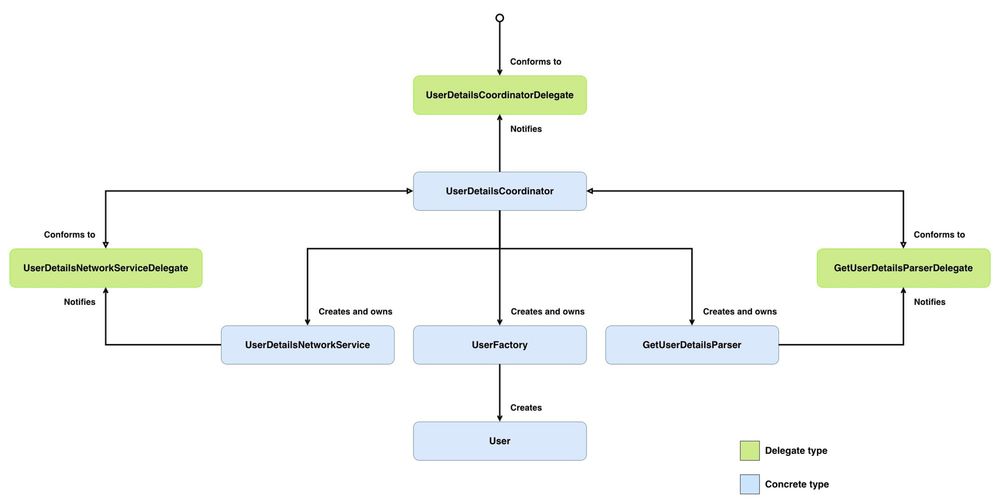
- `UserDetailsCoordinator` \- owns and wires everything together. It creates the network service, parser, and factory, then drives the flow: fetch -> parse -> build. It conforms to both `UserDetailsNetworkServiceDelegate` and `GetUserDetailsParserDelegate`, acting as the single point where data moves between components. Reports the finished `User` (or failure) to its `UserDetailsCoordinatorDelegate`.
- `UserDetailsCoordinatorDelegate` \- the contract between the coordinator and the UI. It defines two methods: one for when a `User` has been successfully fetched and assembled, and one for when something went wrong (We won't see anything conform to `UserDetailsCoordinatorDelegate` as that is outside of the scope of this post).
- `UserDetailsNetworkService` \- makes the SOAP request via `NSURLConnection`, accumulates the response data by conforming to [NSURLConnectionDelegate](https://developer.apple.com/documentation/foundation/nsurlconnectiondelegate?ref=williamboles.com), and reports the outcome to its `UserDetailsNetworkServiceDelegate`.
- `UserDetailsNetworkServiceDelegate` \- the contract between the `UserDetailsNetworkService` and `UserDetailsCoordinator`. It defines two methods: one for when data has been fully received, and one for when the connection fails.
- `GetUserDetailsParser` \- takes raw `NSData`, feeds it to an [NSXMLParser](https://developer.apple.com/documentation/foundation/xmlparser?language=objc&ref=williamboles.com) instance, and walks through the XML collecting element values into a dictionary by conforming to [NSXMLParserDelegate](https://developer.apple.com/documentation/foundation/xmlparserdelegate?language=objc&ref=williamboles.com). When parsing completes, it reports the result to its `GetUserDetailsParserDelegate`.
- `GetUserDetailsParserDelegate` \- the contract between `GetUserDetailsParser` and `UserDetailsCoordinator`. It defines two methods: one for when parsing finishes successfully with a dictionary, and one for when parsing fails.
- `UserFactory` \- builds the `User` model from a parsed XML dictionary.
- `User` \- the model object.
> Don't worry if that doesn't all make sense yet; we will look into each class in greater depth below.
> The code below will prefix using `SWS` \- I haven't included the prefix in the diagram above to make the diagram easier to read by being less cluttered.
## Getting to know the web service
Before we can start coordinating the fetching, parsing, and building, we first need to get to know our SOAP web service.
SOAP (Simple Object Access Protocol) is a protocol for exchanging structured information between systems over a network, using XML as its message format. A SOAP web service exposes operations, e.g. `getFeed`, `getUserDetails`, etc., that a client can call remotely. The entire conversation (request and response) is wrapped in XML envelopes with a specific structure:
- `Envelope` \- the root element that says "this is a SOAP message".
- `Header` \- metadata like authentication tokens. This is optional.
- `Body` \- the actual payload, containing either the request parameters or the response data.
A typical exchange looks like this: your app constructs an XML SOAP request, sends it via [HTTP](https://en.wikipedia.org/wiki/HTTP?ref=williamboles.com) POST to the service's endpoint, and gets back an XML SOAP response.
A request will look like this:
```
12345
```
This is the SOAP request asking the web service to execute the `getUserDetails` operation for a specific user - the `UserID` field value will be replaced with the user that we want to fetch.
And a response will look like this:
```
London
fred.jones@example.com
1234567891
Fred
Jones
1234567891
IG1 1YT
street1
street2
```
This is the SOAP response to that `getUserDetails` request. It returns various user details that we will use to build the `SWSUser` data model.
## Data Model
We will make our `SWSUser` model mirror the response structure:
```
@interface SWSUser : NSObject
{
}
@property (nonatomic, retain) NSString *city;
@property (nonatomic, retain) NSString *email;
@property (nonatomic, retain) NSString *faxNumber;
@property (nonatomic, retain) NSString *firstName;
@property (nonatomic, retain) NSString *lastName;
@property (nonatomic, retain) NSString *phoneNumber;
@property (nonatomic, retain) NSString *postCode;
@property (nonatomic, retain) NSString *street1;
@property (nonatomic, retain) NSString *street2;
@end
@implementation SWSUser
@synthesize city;
@synthesize email;
@synthesize faxNumber;
@synthesize firstName;
@synthesize lastName;
@synthesize phoneNumber;
@synthesize postCode;
@synthesize street1;
@synthesize street2;
- (void)dealloc
{
[city release];
[email release];
[faxNumber release];
[firstName release];
[lastName release];
[phoneNumber release];
[postCode release];
[street1 release];
[street2 release];
[super dealloc];
}
@end
```
Now that we have our request and response structures and a `SWSUser` model, let's implement how to make that SOAP request.
## Network Layer
Before building `SWSUserDetailsNetworkService`, we need a way for it to communicate the outcome of the network call. We are going to use a delegate here so that `SWSUserDetailsNetworkService` can be used with any interested party without having to make any changes to `SWSUserDetailsNetworkService`:
```
@protocol SWSUserDetailsNetworkServiceDelegate
// 1
- (void)didFinishFetchingUserDetails:(NSData *)data;
// 2
- (void)didFailToFetchUserDetails;
@end
```
Here's what we did above:
1. `didFinishFetchingUserDetails:` passes along the data accumulated during the network call.
2. `didFailToFetchUserDetails` passes along that the network call failed.
Now that we know how to communicate the outcome of fetching the user's details, let's make that fetch:
```
// 1
@interface SWSUserDetailsNetworkService : NSObject
{
// 2
NSMutableData *xmlData;
// 3
NSURLConnection *urlConnection;
}
// 4
@property (nonatomic, assign) id networkServiceDelegate;
// 5
- (void)fetchUserDetails:(NSString *)userID;
@end
```
Here's what we did above:
1. `SWSUserDetailsNetworkService` conforms to `NSURLConnectionDelegate` so that it can handle the outcome of the network request.
2. `xmlData` as the response data comes in chunks, we use this to accumulate those chunks into one complete response.
3. `urlConnection` is a reference to the active `NSURLConnection` instance. We hold onto this as an instance variable so that we can cancel it from outside the class if the user navigates away.
4. `networkServiceDelegate` is the object that will receive the finished data once the connection completes. The delegate must conform to `SWSUserDetailsNetworkServiceDelegate`.
5. `fetchUserDetails:` is the method to trigger the network request for fetching the user details.
Let's build out the implementation of `SWSUserDetailsNetworkService`, starting with `fetchUserDetails:`:
```
@implementation SWSUserDetailsNetworkService
@synthesize networkServiceDelegate;
// 1
#define GET_USER_DETAILS_WEBSERVICE_URL @"https://example.com/services/UserService"
// 2
#define GET_USER_DETAILS_SOAP_ACTION @"getUserDetails"
// 3
#define GET_USER_DETAILS_SOAP_MESSAGE @"%@"
- (void)fetchUserDetails:(NSString *)userID
{
// 4
NSString *soapMessage = [NSString stringWithFormat:GET_USER_DETAILS_SOAP_MESSAGE, userID];
// 5
NSURL *url = [NSURL URLWithString:GET_USER_DETAILS_WEBSERVICE_URL];
NSMutableURLRequest *request = [NSMutableURLRequest requestWithURL:url];
NSString *msgLength = [NSString stringWithFormat:@"%d", [[soapMessage dataUsingEncoding:NSUTF8StringEncoding] length]];
[request addValue:@"text/xml; charset=utf-8" forHTTPHeaderField:@"Content-Type"];
[request addValue:GET_USER_DETAILS_SOAP_ACTION forHTTPHeaderField:@"SOAPAction"];
[request addValue:msgLength forHTTPHeaderField:@"Content-Length"];
[request setHTTPMethod:@"POST"];
[request setHTTPBody:[soapMessage dataUsingEncoding:NSUTF8StringEncoding]];
// 6
urlConnection = [[NSURLConnection alloc] initWithRequest:request delegate:self];
// 7
if (!urlConnection)
{
[networkServiceDelegate didFailToFetchUserDetails];
}
}
@end
```
Here's what we did above:
1. The endpoint URL of the SOAP service.
2. The operation name being called.
3. A SOAP envelope XML string with a `%@` placeholder where the `userID` can be inserted.
4. Build the SOAP message by inserting the `userID` into the XML message.
5. Configure the HTTP request: set the content type to XML, attach the SOAP action header, calculate the content length, set the method to POST, and place the SOAP message in the body.
6. Create and start the connection. Unlike `NSURLSession`, where creating a task and starting it are separate steps, `initWithRequest:delegate:` fires the request immediately. We pass `self` as the delegate so that `SWSUserDetailsNetworkService` receives the connection delegate callbacks.
7. If the connection failed to initialise, notify `networkServiceDelegate` of that failure.
Now that we can make a request, we need `SWSUserDetailsNetworkService` to respond to any events from `NSURLConnectionDelegate`:
```
@implementation SWSUserDetailsNetworkService
//Omitted other functionality
// 1
- (void)connection:(NSURLConnection *) connection didReceiveResponse:(NSURLResponse *) response
{
if (xmlData == nil)
{
xmlData = [[NSMutableData alloc] init];
}
[xmlData setLength: 0];
}
// 2
- (void)connection:(NSURLConnection *) connection
didReceiveData:(NSData *) data
{
[xmlData appendData:data];
}
// 3
- (void)connection:(NSURLConnection *) connection didFailWithError:(NSError *) error
{
[networkServiceDelegate didFailToFetchUserDetails];
[urlConnection release];
urlConnection = nil;
[xmlData release];
xmlData = nil;
}
// 4
- (void)connectionDidFinishLoading:(NSURLConnection *)connection
{
[networkServiceDelegate didFinishFetchingUserDetails:xmlData];
[urlConnection release];
urlConnection = nil;
[xmlData release];
xmlData = nil;
}
@end
```
Here's what we did above:
1. Called when the server first responds. We initialise `xmlData` if needed and reset its length to zero. The length reset handles the case where the server sends a redirect, which triggers a new response - without it, we'd end up with stale data from the previous response prepended to the real data.
2. Called potentially multiple times as chunks of the response body arrive. Each chunk is appended to `xmlData`, gradually building up the complete response.
3. Called if the connection fails. We notify `networkServiceDelegate` of that failure and clean up the `ivars`.
4. Called when the response has been fully received. We notify `networkServiceDelegate` of that successful request by giving it the `xmlData` data, and then we clean up the `ivars`.
All that is left to do now is tidy up the state within `SWSUserDetailsNetworkService`, when it is released:
```
@implementation SWSUserDetailsNetworkService
//Omitted other functionality
- (void)dealloc
{
[urlConnection release];
urlConnection = nil;
[xmlData release];
xmlData = nil;
[super dealloc];
}
@end
```
Now that we can send off a request and receive a response, let's build out who conforms to `SWSUserDetailsNetworkServiceDelegate`.
## Coordinating
Like with `SWSUserDetailsNetworkService`, before defining `SWSUserDetailsCoordinator`, let's define how `SWSUserDetailsCoordinator` communicates the outcome of the fetch. We are going to use a delegate here so that `SWSUserDetailsCoordinator` can be used with any interested party without having to make any changes to `SWSUserDetailsCoordinator`:
```
@protocol SWSUserDetailsCoordinatorDelegate
// 1
- (void)didFetchUser:(SWSUser *)user;
// 2
- (void)didFailToFetchUser;
@end
```
Here's what we did above:
1. `didFetchUser:` \- passes along the `SWSUser` instance created by the fetch.
2. `didFailToFetchUser` \- passes along that the fetch failed.
Now that we know how to communicate the outcome of fetching, parsing, and building a user, let's build out the coordinator:
```
// 1
@interface SWSUserDetailsCoordinator : NSObject
{
// 2
SWSUserDetailsNetworkService *networkService;
}
// 3
@property (nonatomic, assign) id coordinatorDelegate;
// 4
- (void)fetchUserDetails:(NSString *)userID;
@end
```
Here's what we did above:
1. `SWSUserDetailsCoordinator` conforms to `SWSUserDetailsNetworkServiceDelegate` so that it can handle the outcome of the network request.
2. `networkService` is the instance of `UserDetailsNetworkService` that it will use to make the network request. `SWSUserDetailsCoordinator` is responsible for keeping it alive.
3. `coordinatorDelegate` is the object that will receive the finished `User`. The delegate must conform to `SWSUserDetailsCoordinatorDelegate`.
4. `fetchUserDetails:` is the method to trigger fetching, parsing, and building a user.
Let's build out the implementation of `SWSUserDetailsCoordinator`, starting with `fetchUserDetails:`:
```
@implementation SWSUserDetailsCoordinator
@synthesize coordinatorDelegate;
// 1
- (void)fetchUserDetails:(NSString *)userID
{
networkService = [[SWSUserDetailsNetworkService alloc] init];
networkService.networkServiceDelegate = self;
[networkService fetchUserDetails:userID];
}
@end
```
Here's what we did above:
1. Create an instance of `SWSUserDetailsNetworkService` and assign it to `networkService`. Set `self` as the delegate of `networkService`. Trigger the fetch on `networkService`.
Now that we can trigger the fetch, let's implement handling the outcome of that fetch:
```
@implementation SWSUserDetailsCoordinator
// Omitted other functionality
// 1
- (void)didFinishFetchingUserDetails:(NSData *)data
{
// TODO: Trigger parsing of data
}
// 2
- (void)didFailToFetchUserDetails
{
[coordinatorDelegate didFailToFetchUser];
}
@end
```
Here's what we did above:
1. Called when the user details request succeeds. Enables the parsing of the returned data to begin.
2. Called when the user details request fails. The `coordinatorDelegate` is then called to share with other interested parties about the failure.
As you can see, we added a `TODO` into the body because we haven't yet implemented `SWSGetUserDetailsParser` \- let's change that.
## Parsing
Like with `SWSUserDetailsCoordinator`, before defining `SWSGetUserDetailsParser`, let's define how `SWSGetUserDetailsParser` communicates the outcome of the parsing. We are going to use a delegate here so that `SWSGetUserDetailsParser` can be used with any interested party without having to make any changes to `SWSGetUserDetailsParser`:
```
@protocol SWSGetUserDetailsParserDelegate
// 1
- (void)didFinishParsingUserDetails:(NSDictionary *)data;
// 2
- (void)didFailToParseUserDetails;
@end
```
Here's what we did above:
1. `didFinishParsingUserDetails:` \- passes along the `NSDictionary` instance that was parsed from the fetched data.
2. `didFailToParseUserDetails` \- passes along that the parsing failed.
Now that we know how to communicate the outcome of parsing, let's build out the parser:
```
// 1
@interface SWSGetUserDetailsParser : NSObject
{
// 2
NSMutableString *foundCharacters;
// 3
NSMutableDictionary *parsedContent;
// 4
BOOL accumulator;
}
// 5
@property (nonatomic, assign) id parserDelegate;
// 6
- (void)parseData:(NSData *)data;
@end
```
Here's what we did above:
1. `SWSGetUserDetailsParser` conforms to `NSXMLParserDelegate`, so it can receive callbacks as `NSXMLParser` works through the XML.
2. `foundCharacters` is a buffer for accumulating the text content of the current XML element. `NSXMLParser` can deliver an element's text across multiple `foundCharacters:` callbacks, so we need to collect them before we can use the value.
3. `parsedContent` is the dictionary that will hold the finished parsed data, keyed by XML element name.
4. `accumulator` is a flag that controls whether we're currently recording text. We only want to capture content inside the `getUserDetails` element, so this acts as a gate - flipped on when we enter that element, flipped off when we leave it, i.e. we ignore the SOAP wrapper.
5. `parserDelegate` is the object that will receive the finished dictionary once the parsing completes. The delegate must conform to `SWSGetUserDetailsParserDelegate`.
6. `parseData:` is the method to trigger parsing of data.
Let's build out the implementation of `SWSGetUserDetailsParser`:
```
@implementation SWSGetUserDetailsParser
@synthesize parserDelegate;
// 1
- (id)init
{
self = [super init];
foundCharacters = [[NSMutableString alloc] init];
accumulator = FALSE;
return self;
}
// 2
- (void)dealloc
{
[foundCharacters release];
foundCharacters = nil;
[parsedContent release];
parsedContent = nil;
[super dealloc];
}
@end
```
Here's what we did above:
1. Initialise the parser with an empty `foundCharacters` buffer ready to accumulate text and `accumulator` set to `FALSE` so we ignore any content until we hit the `getUserDetails` element.
2. Clean up by releasing both `foundCharacters` and `parsedContent`, setting them to `nil` to avoid dangling pointers, and calling `[super dealloc]` to let `NSObject` finish the teardown.
Let's implement the `parseData:`:
```
@implementation SWSGetUserDetailsParser
// Omitted other functionality
// 1
- (void)parseData:(NSData *)data
{
NSXMLParser *parser = [[NSXMLParser alloc] initWithData:data];
[parser setDelegate:self];
[parser parse];
[parser release];
}
@end
```
Here's what we did above:
1. Create an instance of `NSXMLParser`. Set `self` as the delegate of `parser`. Trigger the parsing on `parser`.
> Note, there is no need to hold onto the `NSXMLParser` instance, as this parsing happens synchronously; we just get the response via the `NSXMLParserDelegate` methods.
Let's implement the `NSXMLParserDelegate` methods:
```
@implementation SWSGetUserDetailsParser
//Omitted other functionality
// 1
- (void)parser:(NSXMLParser *)parser didStartElement:(NSString *)elementName namespaceURI:(NSString *)namespaceURI qualifiedName:(NSString *)qName attributes:(NSDictionary *)attributeDict
{
if ([elementName isEqual:@"getUserDetails"])
{
if (parsedContent == nil)
{
parsedContent = [[NSMutableDictionary alloc] init];
}
accumulator = TRUE;
}
}
// 2
- (void)parser:(NSXMLParser *)parser foundCharacters:(NSString *)string
{
if (accumulator)
{
[foundCharacters appendString:string];
}
}
// 3
- (void)parser:(NSXMLParser *)parser didEndElement:(NSString *)elementName namespaceURI:(NSString *)namespaceURI qualifiedName:(NSString *)qName
{
if ([elementName isEqual:@"getUserDetails"])
{
accumulator = FALSE;
}
if (accumulator)
{
if ([foundCharacters length] != 0)
{
[parsedContent setObject:[[foundCharacters copy] autorelease] forKey:elementName];
[foundCharacters setString:@""];
}
}
}
// 4
- (void)parserDidEndDocument:(NSXMLParser *)parser
{
[parserDelegate didFinishParsingUserDetails:parsedContent];
}
// 5
- (void)parser:(NSXMLParser *)parser parseErrorOccurred:(NSError *)parseError
{
[parserDelegate didFailToParseUserDetails];
}
@end
```
Here's what we did above:
1. Called when the parser encounters an opening XML element. We only care about content inside `getUserDetails`, so when we hit that element, we initialise `parsedContent` (if needed) and flip `accumulator` to `TRUE` \- opening the gate for character recording.
2. Called as the parser encounters text content within an element. If `accumulator` is `TRUE`, we append the text to `foundCharacters`. We append rather than replace because `NSXMLParser` can deliver a single element's text across multiple callbacks.
3. Called when the parser encounters a closing XML element. If we're closing `getUserDetails`, we flip `accumulator` back to `FALSE` \- closing the gate. Otherwise, if we're still inside `getUserDetails` and have accumulated some text, we store a copy of it in `parsedContent` keyed by the element name (e.g. `firstName` \-> `Fred`) and reset `foundCharacters`, ready for the next element.
4. Called when the parser has successfully finished processing the entire XML document. We notify `parserDelegate` of that successful parsing.
5. Called when the parser has unsuccessfully finished processing the XML document. We notify `parserDelegate` of that unsuccessful parsing.
With the response now parsed, we can head back to `SWSUserDetailsCoordinator` and fill in that `TODO`.
## Back to Coordinating
With `SWSGetUserDetailsParser`, we can update `SWSUserDetailsCoordinator` to use it, starting with the header:
```
// 1
@interface SWSUserDetailsCoordinator : NSObject
{
// Omitted other functionality
// 2
SWSGetUserDetailsParser *parser;
}
// Omitted other functionality
@end
```
Here's what we did above:
1. Updated `SWSUserDetailsCoordinator` to now conform to `SWSGetUserDetailsParserDelegate`.
2. Created an `ivar` to hold the `SWSGetUserDetailsParser` instance.
Let's update the implementation to build `parser` and make use of it:
```
@implementation SWSUserDetailsCoordinator
// Omitted other functionality
- (void)fetchUserDetails:(NSString *)userID
{
networkService = [[SWSUserDetailsNetworkService alloc] init];
networkService.networkServiceDelegate = self;
// 1
parser = [[SWSGetUserDetailsParser alloc] init];
// 2
parser.parserDelegate = self;
[networkService fetchUserDetails:userID];
}
// Omitted other functionality
// 3
- (void)didFinishFetchingUserDetails:(NSData *)data
{
[parser parseData:data];
}
@end
```
Here's what we did above:
1. Create an instance of `SWSGetUserDetailsParser` and assign it to `parser`.
2. Set `self` as the delegate of `parser`.
3. Pass `data` to `parser` to begin parsing.
Now let's implement the `SWSGetUserDetailsParserDelegate` methods:
```
@implementation SWSUserDetailsCoordinator
// Omitted other functionality
// 1
- (void)didFinishParsingUserDetails:(NSDictionary *)data
{
// TODO: Build the SWSUser from the dictionary
}
// 2
- (void)didFailToParseUserDetails
{
[coordinatorDelegate didFailToFetchUser];
}
@end
```
Here's what we did above:
1. Called when the user details parsing succeeds. Enables the creation of a `SWSUser` from the returned dictionary.
2. Called when the user details parsing fails. The `coordinatorDelegate` is then called to share with other interested parties about the failure.
As you can see, we added a `TODO` into the body because we haven't yet implemented `SWSUserFactory` \- let's change that.
## Building the User
There is no need for `SWSUserFactory` to have a delegate, as it can directly return the outcome of converting the dictionary produced by the parser into a `SWSUser` instance:
```
@interface SWSUserFactory : NSObject
{
}
// 1
- (SWSUser *)createUser:(NSDictionary *)data;
@end
```
Here's what we did above:
1. `createUser:` is the method to trigger parsing of a dictionary into a `SWSUser` instance.
Let's build out the implementation of `SWSUserFactory`:
```
@implementation SWSUserFactory
- (SWSUser *)createUser:(NSDictionary *)data
{
User *user = [[[SWSUser alloc] init] autorelease];
// 1
for (id key in data)
{
NSString *capitalizeElementName = [key stringByReplacingCharactersInRange:NSMakeRange(0,1) withString:[[key substringToIndex:1] uppercaseString]];
NSString *selector = [NSString stringWithFormat:@"set%@:", capitalizeElementName];
SEL elementSelector = NSSelectorFromString(selector);
if ([user respondsToSelector:elementSelector])
{
[user performSelector:elementSelector withObject:[data objectForKey:key]];
}
}
return user;
}
@end
```
Here's what we did above:
1. Loop through each key in the dictionary (e.g. `firstName`, `city`) and dynamically build a setter selector from it - `firstName` becomes `setFirstName:`, `city` becomes `setCity:`. If `SWSUser` responds to that selector, we call it with the corresponding value from the dictionary. Using a selector avoids writing a long chain of `if` statements mapping each key to a property manually.
With the dictionary now converted into a `SWSUser` instance, we can head back to `SWSUserDetailsCoordinator` and fill in that `TODO`.
## Back to Coordinating
With `SWSUserFactory`, we can update `SWSUserDetailsCoordinator` to use it, starting with the header:
```
@interface UserDetailsCoordinator : NSObject
{
// Omitted other functionality
// 1
SWSUserFactory *userFactory;
}
// Omitted other functionality
@end
```
Here's what we did above:
1. Created an `ivar` to hold the `SWSUserFactory` instance.
Let's update the implementation to build `userFactory` and make use of it:
```
@implementation SWSUserDetailsCoordinator
// Omitted other functionality
- (void)fetchUserDetails:(NSString *)userID
{
networkService = [[SWSUserDetailsNetworkService alloc] init];
networkService.networkServiceDelegate = self;
parser = [[SWSGetUserDetailsParser alloc] init];
parser.parserDelegate = self;
// 1
userFactory = [[SWSUserFactory alloc] init];
[networkService fetchUserDetails:userID];
}
// Omitted other functionality
// 2
- (void)didFinishParsingUserDetails:(NSDictionary *)data
{
SWSUser *user = [userFactory createUser:data];
[coordinatorDelegate didFetchUser:user];
}
@end
```
Here's what we did above:
1. Create an instance of `SWSUserFactory` and assign it to `userFactory`.
2. Pass `data` to `userFactory` to begin converting into a `SWSUser` instance. Return the `SWSUser` instance via the `coordinatorDelegate`.
All that is left to do now is tidy up the state within `SWSUserDetailsCoordinator`, when it is released:
```
@implementation SWSUserDetailsCoordinator
// Omitted other functionality
- (void)dealloc
{
[networkService release];
[parser release];
[userFactory release];
[super dealloc];
}
@end
```
And that's everything 🥳.
## Wrapping up
We started with the task: connect to a SOAP web service and get back a User. Rather than lumping everything into one class, we split the work across components with clear boundaries - `SWSUserDetailsNetworkService` handles the connection, `SWSGetUserDetailsParser` handles the XML, and `SWSUserFactory` assembles the model. `SWSUserDetailsCoordinator` wires them together without any of them needing to know about each other.
If the web service team changes the XML structure tomorrow, only `SWSGetUserDetailsParser` needs to change. If the `SWSUser` model gains new properties, only `SWSUserFactory` and `SWSUser` need updating. That's the payoff from separating concerns - changes stay contained.